That gut-wrenching moment your phone hits the pavement is a universal fear, but the bill that comes after is anything but standard. The real cracked screen repair cost usually falls somewhere between $100 and over $400, but that final number depends entirely on your specific phone, the extent of the damage, and where you take it for repair.
Knowing what to expect can help you make a smart decision instead of a panicked one. High-end flagship phones will always be pricier to fix, while older models are generally much kinder to your wallet.
What Is the Real Cost of a Cracked Screen Repair
We've all been there. Your phone slips, gravity takes over, and you're left holding your breath as you pick it up to inspect the damage. The cost to fix that spiderweb of cracks isn't one set price; it's a huge range influenced by your device's brand, its model, and the type of shop you choose. Knowing this from the get-go helps manage expectations and avoid any nasty surprises when you get the quote.
This chart shows just how dramatically repair costs can swing between different high-end models and the more affordable third-party options.
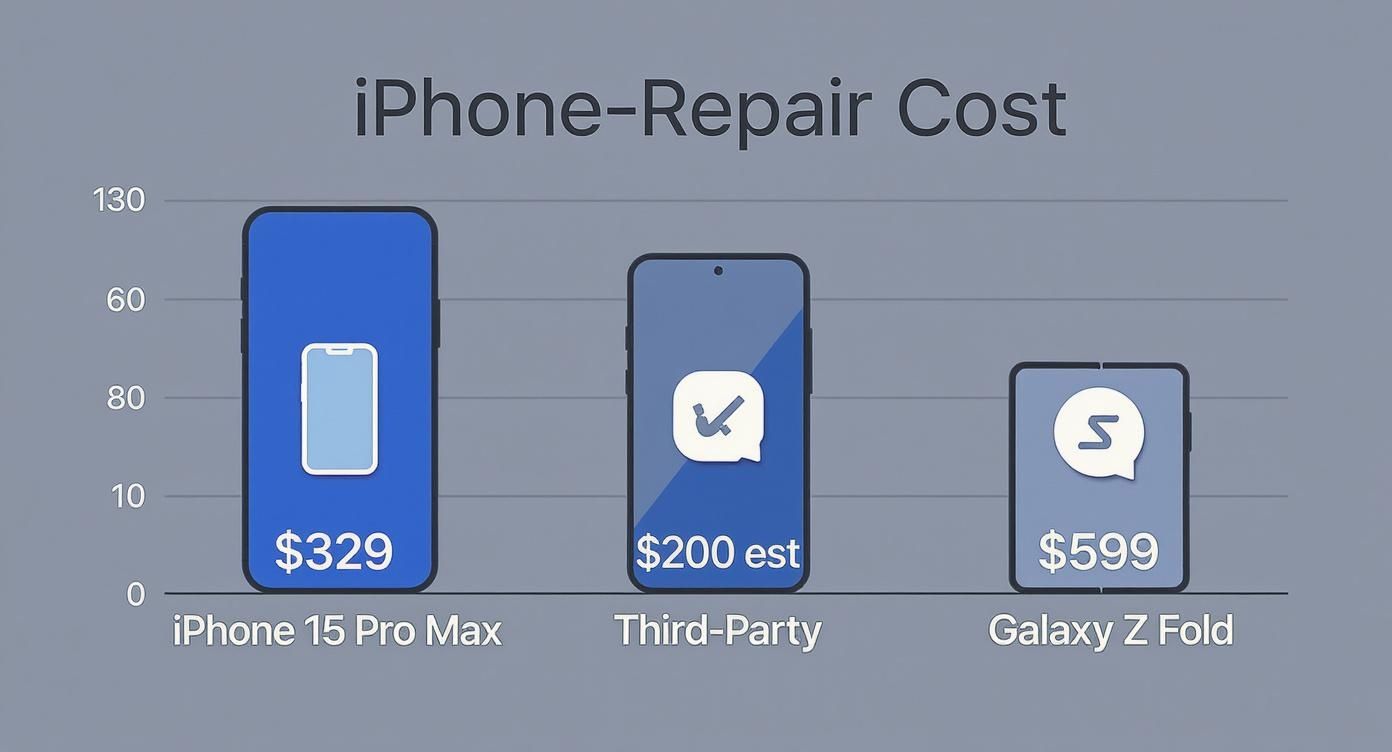
As you can see, a premium device like the Galaxy Z Fold costs a small fortune to fix because of its complex, foldable screen technology. Meanwhile, an independent shop can often save you a significant amount of cash on more common models.
Why Prices Vary So Much
The trend is pretty clear: repair costs are on the rise, especially for the latest and greatest phones. Out-of-warranty screen repairs directly from Apple can run anywhere from $129 for an iPhone SE to a hefty $329 for an iPhone 15 Pro Max. Samsung isn't much different, with official repairs starting around $79 but skyrocketing to as much as $599 for their innovative foldable phones.
So what gives? It all comes down to the technology packed into your screen. Newer phones boast stunning OLED or Super Retina XDR displays that are incredibly vibrant and responsive. But that beauty comes at a cost—they're far more expensive to manufacture and, therefore, to replace than the older LCD screens you'll find in budget-friendly models.
Comparing Your Options: Manufacturer vs. Local Shop
When your screen shatters, you basically have two main paths you can take: go straight to the manufacturer (like an Apple Store or Samsung service center) or find a trusted local repair shop.
- Manufacturer Repair: This is your best bet for a guaranteed original equipment manufacturer (OEM) part, which is identical to the screen your phone was built with. However, you'll pay a premium for that brand assurance, and it often means mailing your device away for days, leaving you without a phone.
- Third-Party Repair Shop: A local expert can almost always get the job done faster and for less money. A reputable shop will also be transparent about your options, letting you choose between OEM and high-quality aftermarket parts to fit your budget and needs.
Ultimately, the best choice depends on what matters most to you: your budget, how quickly you need your phone back, and what kind of device you have. For a deep dive into what different models cost, check out our guide on iPhone screen repair cost.
To help you see the difference, here's a look at some estimated costs.
Estimated Screen Repair Costs: Manufacturer vs. Third-Party
This table gives you a side-by-side look at what you might pay for some of today's most popular phones, comparing the official manufacturer price to what you'd typically find at a local shop.
| Phone Model | Official Manufacturer Repair Cost (Est.) | Typical Third-Party Repair Cost (Est.) |
|---|---|---|
| iPhone 15 Pro Max | $329 | $200 – $280 |
| Samsung Galaxy S24 Ultra | $319 | $220 – $300 |
| Google Pixel 8 Pro | $290 | $200 – $270 |
| iPhone SE (3rd Gen) | $129 | $70 – $110 |
The takeaway is clear: while manufacturer repairs guarantee original parts, you can often find significant savings—without sacrificing quality—by working with a trusted local professional who stands by their work.
The Hidden Factors Driving Your Repair Bill
Ever get a repair quote and wonder why your friend paid half as much for what looked like the same crack? The final price tag on a screen repair isn't just pulled out of a hat. It's determined by a few key factors, and once you understand them, you'll know exactly what you're paying for and can ask the right questions.
Think of it like getting a dent fixed on your car. The final bill isn’t random—it depends on the make and model, the type of paint needed, and how deep the damage really is. Phone repairs work the same way.
Your Phone's Model and Screen Technology
The single biggest factor, hands down, is your phone's specific model. A screen for a brand-new, top-of-the-line iPhone will always cost more than one for a five-year-old budget Android. That’s because not all screens are built the same.
- LCD (Liquid Crystal Display): You’ll find these in older iPhones (like the iPhone 11 or SE) and many budget-friendly Android phones. They're cheaper to manufacture, so they're cheaper to replace.
- OLED (Organic Light Emitting Diode): This is the technology inside most modern premium phones, like the iPhone 15 Pro or Samsung Galaxy S24. They deliver those deep, perfect blacks and vibrant colors we love, but the parts themselves are significantly more expensive.
Swapping out a high-end OLED screen is like replacing a part on a luxury car—the component itself just costs more right from the supplier.
The Quality of the Replacement Part
When you get your screen fixed, you’re not just paying for a technician's time; you’re buying a new part. The type of part used makes a huge difference in your final bill. The good news is, a good shop will give you a choice.
OEM (Original Equipment Manufacturer) parts are identical to the screen your phone came with, straight from the original maker. They offer perfect quality but carry the highest price tag. On the other hand, high-quality aftermarket parts are made by third-party companies and offer a more affordable option that can perform almost identically to the original.
A reputable repair shop will be upfront about the parts they use, explaining the pros and cons of each so you can decide how to balance cost and quality based on what works for your budget.
The True Extent of the Damage
Sometimes, a crack is more than just a crack. What looks like a simple cosmetic problem on the surface can hide deeper issues that make the repair more complex and costly. A technician needs to diagnose the full extent of the damage.
For example, does the touch screen still work perfectly everywhere? Are there dead spots, weird flickering lines, or black "ink" blotches spreading under the glass? If the digitizer (the layer that senses your touch) or the OLED/LCD panel itself is also broken, the job requires a full screen assembly replacement. That’s more involved—and expensive—than a simple "glass-only" fix. The more components that are damaged, the higher your cracked screen repair cost will be.
DIY Repair Kits vs. Professional Service
When you’re staring at a cracked screen, the siren song of a cheap DIY repair kit on Amazon can be tempting. The idea of saving a hundred dollars is hard to ignore, but that path is loaded with risks that can turn a simple fix into an expensive disaster. It's the classic showdown: saving money now versus potential headaches later.
The main selling point of the DIY approach is obvious—it’s cheaper upfront. But that low price assumes you have the steady hands of a surgeon, the patience of a saint, and the technical know-how to perform what is essentially microsurgery on a very delicate, very expensive piece of electronics.
The Real Risks of a Do-It-Yourself Repair
Trying to replace a screen without the right experience is a gamble. One wrong move with a prying tool or one misplaced screw can cascade into much bigger problems, turning a screen issue into a full-blown crisis.
- Causing More Damage: It’s shockingly easy to tear a fragile ribbon cable, damage the camera, or short-circuit the logic board. These mistakes can cost hundreds of dollars to fix—far more than you would have paid a professional in the first place.
- Instantly Voiding Your Warranty: If your phone is still covered by any kind of manufacturer warranty, the moment you open it up yourself, that coverage is gone. Forever.
- Lacking the Right Tools: Modern phones require specialized tools that don’t come in basic kits, like precision heating pads and suction tools. Without them, you risk cracking the frame or damaging other internal components.
The hard truth is that the lower cracked screen repair cost of a DIY kit often comes with the hidden price of risk. If something goes wrong, you're left holding a completely dead phone with no one to call for help.
The Peace of Mind That Comes with a Professional
Choosing a professional repair shop means trading that risk for reliability and peace of mind. Yes, the upfront cost is higher, but you’re paying for much more than just a new screen. You're investing in experience, quality parts, and a warranty that the job will be done right. Our professional screen repair service ensures your device is handled correctly from the moment you hand it over.
Repair costs have definitely gone up. Simple fixes that used to be in the $60–$80 range now often top $120. That's mostly because today's complex OLED and foldable screens demand advanced skills and tools to handle correctly. You can read more about these smartphone repair market trends on einpresswire.com. A professional service navigates all that complexity for you, guaranteeing a perfect fit and function, all backed by a warranty.
Ultimately, the choice comes down to what your time, your data, and your phone are worth to you.
How Insurance and AppleCare Affect Your Cost
Before you pay the full out-of-pocket price for a screen repair, it’s worth checking to see if you’re already covered by a plan you might have forgotten about. Many people have phone insurance or an extended warranty like AppleCare+ but aren't sure how to use it. These plans can dramatically slash your repair bill, turning a potential budget-breaker into a minor inconvenience.
Think of it like car insurance: you pay a small fee—the deductible—after an accident, and the insurance company handles the rest of the massive bill. Phone protection plans work in a very similar way.
Using AppleCare+ for Screen Repairs
For iPhone users, AppleCare+ is one of the most straightforward ways to save money. Instead of facing a repair bill that could top $300 for a newer model, you pay a much smaller, predictable service fee.
For a standard screen repair, the AppleCare+ service fee is just $29. That small fee covers the entire cost—the genuine OEM part, the labor, and the service. It’s an incredibly cost-effective option if you have an active plan.
To use it, you just need to schedule a repair with Apple or an Apple Authorized Service Provider and confirm your coverage is active. This is a massive saving compared to the out-of-warranty price and guarantees you get a genuine Apple display.
Navigating Carrier and Third-Party Insurance
If you have phone insurance through your mobile carrier (like Verizon or AT&T) or a third-party company, the process is a little different but just as valuable. These plans usually require you to file a claim and pay a deductible, which can range from $50 to over $200 depending on your specific policy and device.
Here’s the typical game plan:
- Check Your Coverage: First, confirm you have an active insurance plan. You can usually find this on your monthly bill or by logging into your carrier's online portal.
- File a Claim: Next, you'll need to contact the insurance provider (often a company like Asurion) to start the claim process online or over the phone.
- Pay the Deductible: Once your claim is approved, you'll pay the required deductible.
- Get It Repaired: The insurance company will then direct you to an approved repair partner or, in some cases, mail you a replacement device.
Understanding your coverage can make a huge difference, not just for phones but for other gadgets, too. You can find more details on how these costs break down in our complete guide to the average cost of an iPad screen repair.
Smart Ways to Lower Your Next Repair Bill
Let's be honest—nobody wants to pay for a repair. But you have more control over that final bill than you might think. A few smart decisions can either prevent the next accident or seriously cut down the cost of a cracked screen when it happens.
The absolute best way to save money on a repair is to avoid needing one in the first place. Think of it as preventative care for your phone. A durable, shock-absorbing case and a high-quality tempered glass screen protector are your first line of defense. It's a small investment upfront that can save you from a several-hundred-dollar headache down the road.
Knowing When to Repair vs. Replace
For older phones, you'll eventually hit a point where a repair just doesn't make financial sense. A good rule of thumb is this: if the repair quote is more than 50% of the phone's current resale value, it’s probably time to put that money toward a new device instead.
For newer phones, however, repair is almost always the more economical and environmentally friendly choice. It's no surprise that spending on screen repairs is climbing—Americans spent an estimated $8.3 billion in 2023 alone, nearly triple the amount from 2018. You can read more about the rising costs of cellphone screen repairs in the United States on claimsjournal.com.
Actionable Tips to Save on Your Current Repair
Okay, so the damage is already done. Your screen is cracked, and you're worried about the bill. Don't sweat it—you still have options. Being an informed customer makes all the difference.
- Ask About Part Options: A good repair shop won't just give you a single price. Ask if they offer high-quality aftermarket screens in addition to original OEM parts. These alternatives can deliver nearly identical performance for a lower cost, giving you a choice that fits your budget.
- Bundle Your Repairs: Is your battery also on its last legs? If it dies by 3 PM every day, ask about bundling a new battery with your screen fix. Most shops offer a discount for doing multiple repairs at once, saving you time, a second trip, and money.
By asking the right questions and thinking ahead, you can walk away feeling confident you got the best possible value. A good technician will walk you through your choices without any pressure, making sure you understand exactly what you're paying for.
Got Questions About Your Screen Repair? We’ve Got Answers.
When your phone breaks, you have questions. We get it—your device is your connection to the world, and trusting someone to fix it is a big deal. At Salvation Repair, we’ve heard just about every question from our customers, so here are the honest answers to the most common ones.
Will My Phone Still Be Water-Resistant After the Screen Is Replaced?
This is one of the most important questions you can ask. The honest answer is: it changes things. Any repair that requires opening your phone breaks the original factory seal that provides water resistance.
A professional repair shop will always apply a new adhesive seal to restore water resistance as much as possible. However, it's critical to understand that no third-party repair can guarantee the original, fresh-out-of-the-box IP rating. The safest approach is to be more cautious around water after any screen repair.
How Long Does a Screen Repair Actually Take?
You’ll probably be surprised by how fast it is. For most popular phones like iPhones and Samsung Galaxy models, an experienced technician can complete a screen replacement in about 45 to 60 minutes.
You can often drop it off on your lunch break and have it back before you head back to the office. We understand that you need your device back quickly, so we work efficiently to get you reconnected without disrupting your entire day.
What about my photos and contacts? Is my data safe?
A standard screen repair is a hardware replacement—it shouldn't touch your personal data at all. Your photos, apps, messages, and contacts will remain safe on the device. That said, it’s always a smart practice to back up your device before any kind of repair, just for your own peace of mind.
Ready to get that screen fixed today? The team at Salvation Repair is here to help with fast, reliable, and affordable repairs. We’re always transparent about our pricing and process. Get your free quote and book your repair online!
Article created using Outrank