Samsung phone repair: Fast, Reliable 2025
Why Samsung Phone Repair Matters More Than You Think
Samsung phone repair is available through multiple convenient options to get your device working again quickly. Here’s what you need to know:
Quick Answer: Your Samsung Phone Repair Options
- Walk-In Service – Same-day repairs at authorized locations like Salvation Repair (most repairs completed in 2 hours or less)
- Mail-In Service – Ship your device for repair with 5-7 business day turnaround
- What to Bring – Your device, original charger/cable, and backup your data first
- Typical Issues – Cracked screens, battery problems, charging port failures, and moisture detection errors
Your Samsung Galaxy phone is more than just a device. It’s your connection to work, family, and the world around you. When that screen cracks or the battery stops holding a charge, life doesn’t pause. You need solutions that are fast, affordable, and reliable.
The good news? Getting your Samsung device repaired is easier than ever. Whether you prefer walking into a local shop or mailing your phone in from home, there are certified repair options designed to fit your schedule and budget. With most repairs completed within two hours at authorized locations, you won’t be disconnected for long.
But before you hand over your phone to anyone, there’s important information you need to know. From protecting your personal data with Maintenance Mode to understanding warranty coverage, the right preparation can save you time, money, and stress.
I’m Ralph Harris, and with over 20 years in electronics repair and more than 500 Apple repair certifications, I’ve seen every Samsung phone repair scenario imaginable. At Salvation Repair, we’ve helped thousands of customers restore their devices to perfect working condition, and I’m here to guide you through every step of the process.
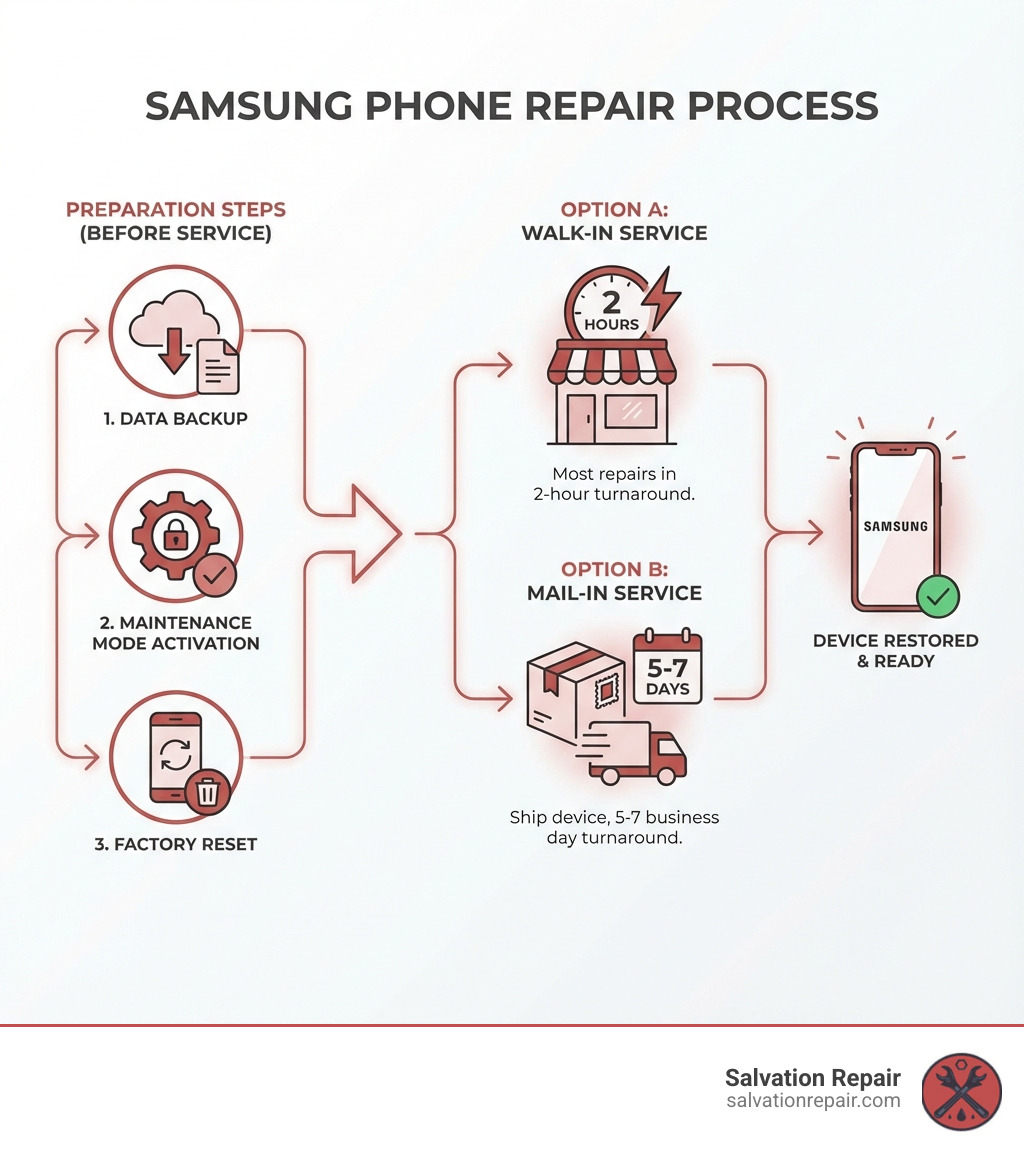
Step 1: Preparing Your Samsung Device for Service
Before you even think about dropping off or shipping your Samsung device for repair, there are a few crucial steps to take. Think of it like preparing for a trip – you wouldn’t leave home without packing your essentials, right? Similarly, preparing your phone properly ensures your data stays safe, and the repair process goes as smoothly and quickly as possible. We want to make sure your Samsung phone repair experience is stress-free from start to finish.
This pre-repair checklist is all about protecting your privacy and making the technician’s job easier. It also helps us get your phone back to you faster! For more information about our services, visit our dedicated page: More info about our services.
Protecting Your Privacy with Maintenance Mode
Imagine handing your phone over for repair and worrying about someone seeing your vacation photos, private messages, or banking apps. Yikes! Thankfully, Samsung has a brilliant feature called Maintenance Mode, designed specifically to prevent this nightmare.
What is Maintenance Mode? It’s a special mode available on Samsung phones and tablets updated to at least One UI 5. When activated, it essentially creates a separate, temporary user account for the repair technician. This means they can perform diagnostics and repairs without ever accessing your personal Samsung account, photos, contacts, messages, or any other sensitive data. It’s like giving them a spare key to an empty guest room, not your entire house!
How to enable Maintenance Mode:
- Steer to Settings.
- Tap on Device care.
- Look for Maintenance mode and tap on it.
- Tap Turn on.
Important Note: If you don’t already have one, you’ll need to set up a lock screen (PIN, pattern, or password) before you can enable Maintenance Mode. This ensures that even after the repair, your personal data remains secure behind your chosen lock. Once activated, the technician can access basic device functions and run tests, but your private world remains, well, private! When you get your phone back, simply exit Maintenance Mode, and all your personal data will reappear exactly as you left it.
Backing Up Data and Securing Your Accounts
Even with Maintenance Mode, a belt-and-suspenders approach to data security is always best. We strongly recommend backing up all your precious data before any Samsung phone repair. While we take the utmost care, accidents can happen, and having a backup is your ultimate peace of mind.
Here are a few ways to back up your data:
- Samsung Smart Switch: This free software from Samsung for PC or Mac allows you to transfer contacts, messages, photos, videos, apps, and even settings from your Samsung device to your computer or another Samsung device. It’s incredibly comprehensive and user-friendly.
- SD Card Backup: If your Samsung device has an SD card slot, you can easily move photos, videos, and documents directly to the card. Just remember to remove the SD card before sending your phone for repair!
- Samsung DeX for Broken Screens: What if your screen is so damaged you can’t even steer your phone to back up? Don’t despair! If your device supports Samsung DeX, you might be able to connect it to an external display (like a monitor or TV) and use a mouse and keyboard to steer and back up your files. It’s a lifesaver for devices with unresponsive screens.
- Cloud Services: Ensure your photos are synced to Google Photos, Samsung Cloud, or another cloud service.
- Removing Google and Samsung Accounts: This is a critical step for data security. Before a repair, we advise you to remove your Google Account and any other personal accounts (like your Samsung account) from the device. This prevents unauthorized access and ensures that the device is no longer linked to your personal data should it fall into the wrong hands during transit or repair.
- Performing a Factory Data Reset: After backing up and removing accounts, performing a factory data reset is the ultimate step in data security. This wipes all personal data from the device, returning it to its original factory settings. It’s a clean slate for the technician and ensures absolute privacy.
By following these steps, you’ll be well-prepared for any Samsung phone repair, knowing your data is safe and sound.
Step 2: Professional Samsung Phone Repair at Salvation Repair
When your Samsung phone needs fixing, you want experts you can trust. At Salvation Repair, we pride ourselves on offering professional, reliable Samsung phone repair services right here in Mississippi. Our certified technicians are equipped with the knowledge and tools to handle a wide range of issues, ensuring your device gets the best care possible.
We understand the intricacies of Samsung devices, from their vibrant AMOLED displays to their complex internal components. We use high-quality parts to ensure your repair lasts, and we can guide you through both in-warranty and out-of-warranty repairs. No matter the problem, we’re here to help. You can find a Salvation Repair location near you at Find a Salvation Repair Location.
Walk-In Service: Fast, Reliable Samsung Phone Repair
Need your phone fixed now? Our walk-in service is designed for speed and convenience. We know how disruptive a broken phone can be, which is why we offer same-day, on-site repairs for many common issues. In fact, many repairs can be completed in as little as two hours! This means you can drop off your phone, grab a coffee, run an errand, and often pick it up fully functional before you even miss it.
With locations in Laurel, Jackson, and Oxford, MS, we make it easy for you to get the professional help you need without a long wait. You don’t need an appointment, but calling ahead can sometimes help us prepare for your specific issue and ensure the fastest possible turnaround.
What to bring for service:
- Your Samsung device: Of course!
- Original charger and cable: Especially if the issue is power-related (e.g., not charging, battery draining fast). This helps our technicians diagnose the problem accurately.
- Any relevant SD card: If your issue is related to storage or files, bring the SD card (but remember to back up its contents first!).
- Proof of purchase/warranty information: If you believe your repair might be covered under warranty, having this handy can speed up the process.
Most importantly, remember to complete the preparation steps from Step 1: back up your data, remove your Google Account, and factory reset your device or enable Maintenance Mode. This ensures your privacy and helps us get straight to the repair. For more on our speedy service, check out our Phone Repair Same Day page.
Mail-In Service: Convenient Repairs from Home
Sometimes, life gets busy, or you’re just not close enough to one of our convenient locations. That’s where mail-in service comes in handy. While we love seeing your faces, we understand the need for flexibility. Our mail-in service allows you to send your Samsung device to us for expert repair, no matter where you are in Mississippi.
The process is straightforward:
- Initiate your repair: Contact us to discuss your issue and get a repair quote. We’ll provide you with instructions on how to send your device.
- Prepare your device: Follow all the data backup and security steps outlined in Step 1. This is even more critical for mail-in service, as your device will be out of your hands for a longer period.
- Packaging: Securely package your device in a sturdy box with adequate cushioning. Crucially, do not include the original box, cases, screen protectors, or SIM cards unless specifically instructed. If the issue is power-related, include the original charger and cable. We want to be sure your device arrives safely and that no personal accessories are accidentally misplaced.
- Shipping: We’ll guide you on how to ship your device using trusted carriers. You’ll typically receive a shipping label from us to make the process easy.
- Inspection and Repair: Once we receive your device, our technicians will inspect it, confirm the issue, and proceed with the repair. Mail-in service repairs typically take 5-7 business days for inspection and repair, plus shipping time.
- Tracking Your Repair Status: We’ll keep you updated throughout the process, and you’ll be able to track your repair status.
- Return Shipping: Once repaired, your device will be carefully packaged and shipped back to you. We use trusted carriers and efficient shipping methods to get your phone back to you swiftly.
Understanding Your Warranty Options
Navigating warranties can sometimes feel like trying to solve a Rubik’s Cube blindfolded. But don’t worry, we’re here to help clarify your options for Samsung phone repair.
Most Samsung mobile devices come with a standard limited warranty that covers manufacturing defects for a specific period (usually one year from purchase). This typically means if your screen suddenly stops working without physical damage, or a button fails, it might be covered.
However, understand what’s typically NOT covered:
- Accidental damage: This is the big one. Drops, spills, cracked screens (unless part of a specific “cracked screen offer” from Samsung), and liquid damage are usually not covered by the standard manufacturer’s warranty. This is where most of our Samsung phone repair services come into play.
- Normal wear and tear: Over time, devices show signs of use. Batteries naturally degrade, and minor cosmetic scuffs aren’t typically covered.
- Unauthorized repairs: If you (or another unauthorized repair shop) attempt to fix your phone and cause further damage, Samsung’s warranty may be voided. This is why choosing certified technicians like ours is so important.
At Salvation Repair, we handle both in-warranty and out-of-warranty repairs. If your device is still under manufacturer warranty and the issue is covered, we can guide you on how to proceed. For out-of-warranty repairs (which is most common for issues like cracked screens), we offer competitive pricing and our own lifetime warranty on parts and labor for the repair we perform.
We can also discuss options for extended warranties or protection plans that you might have purchased, like Samsung Care+. Always bring any relevant documentation, and we’ll help you understand your best course of action. For more detailed information on warranties, please visit our Read More About Warranties page.
Common Samsung Phone Problems That Need Fixing
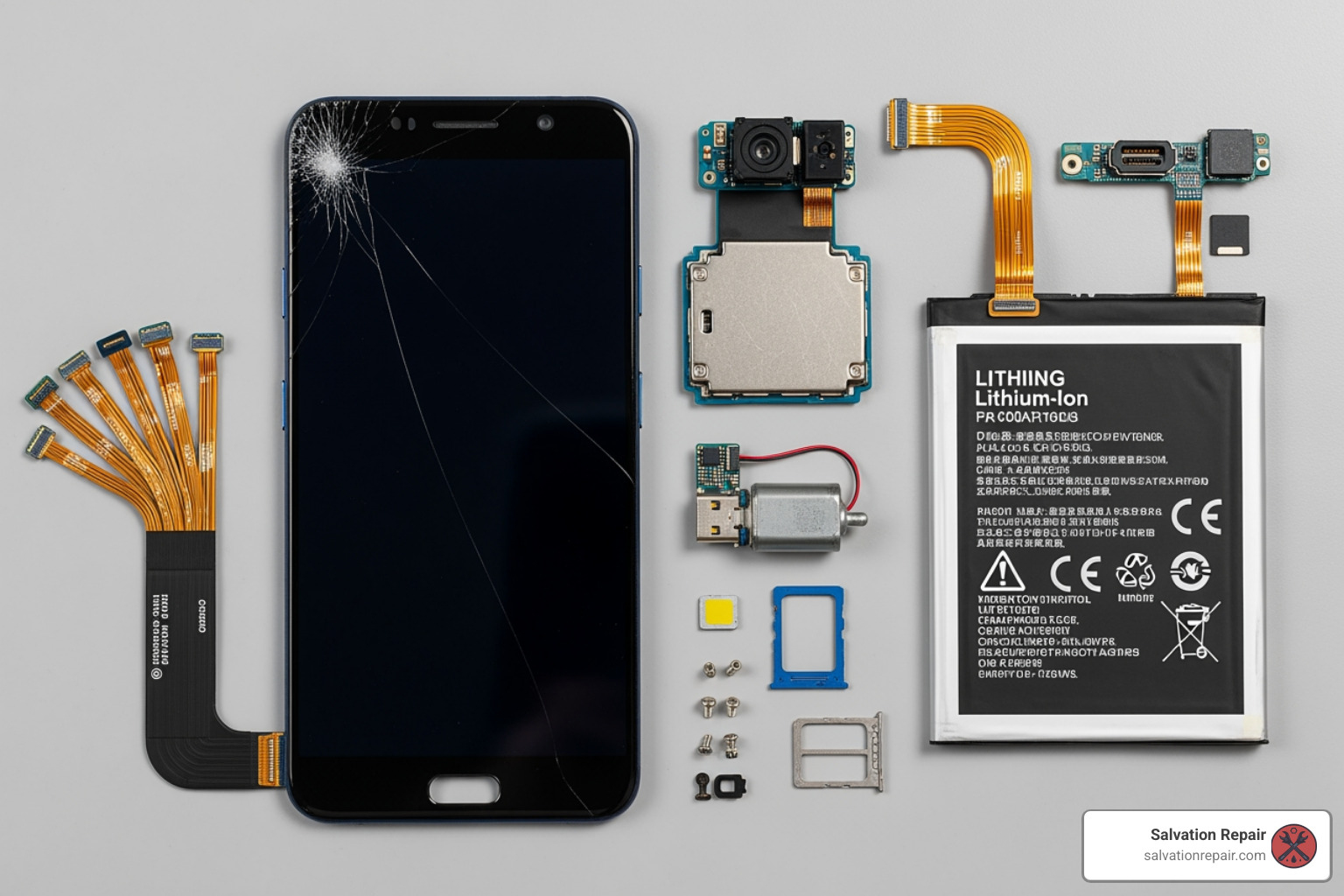
Samsung phones are incredible pieces of technology, but like any device, they can run into issues. From accidental drops to everyday wear and tear, we’ve seen it all at Salvation Repair. Our expertise allows us to quickly diagnose and fix common problems, ensuring your Samsung phone repair is efficient and effective. Let’s look at some of the most frequent culprits that bring Samsung users through our doors.
Cracked Screens and Display Issues
This is hands down the most frequent Samsung phone repair we encounter. That beautiful, vibrant AMOLED display is often the first thing to suffer from an unfortunate tumble. Whether it’s a hairline crack that’s an annoyance or a shattered mess that makes your phone unusable, a damaged screen needs professional attention.
Samsung’s displays are known for their stunning clarity and color, but they are also delicate.
- Cracked Glass: The outer layer is cracked, but the display underneath still functions.
- Dead Pixels or Discoloration: Dark spots, lines, or discolored areas appear on the screen, indicating damage to the display panel itself.
- Unresponsive Touchscreen: The screen might look fine, but it no longer registers your touches.
- Foldable Screen Repairs: With the rise of devices like the Galaxy Z Fold and Z Flip, we’re also seeing unique display challenges. These flexible screens require specialized tools and expertise. Samsung has even offered promotional pricing for first-time foldable screen repairs, recognizing their unique nature. At Salvation Repair, we’re equipped to handle these advanced repairs, restoring your foldable phone to its original glory.
A cracked screen is more than just an aesthetic issue; it compromises your phone’s water resistance and can lead to further damage if left unrepaired. Don’t let a broken screen ruin your day – we can help! For more information, visit our Broken Phone Screen Repair and Cracked Screen pages.
Battery and Charging Port Failures
Next to cracked screens, battery and charging port problems are among the most common reasons for Samsung phone repair. Batteries have a finite lifespan, and charging ports endure a lot of wear and tear.
Signs of battery degradation:
- Fast-Draining Battery: Your phone used to last all day, but now it’s gasping for power by lunchtime.
- Unexpected Shutdowns: Your phone suddenly dies, even when it shows a decent percentage of charge.
- Overheating: The back of your phone feels unusually warm, especially during charging or light use.
- Swollen Battery: In rare but serious cases, the battery can swell, pushing against the screen or back panel. If you notice this, bring it to us immediately!
Charging Port Issues:
- “Moisture detected” error: This annoying message can pop up even when your phone is dry. It can be caused by actual moisture, but often it’s due to debris, corrosion, or a faulty sensor in the charging port.
- Loose Charging Port: Your charging cable wiggles excessively, or you have to hold it at a specific angle to get your phone to charge.
- Not Charging: Your phone simply won’t charge, or charges inconsistently, even with a working cable and adapter. This could be a dirty port, a damaged port, or an internal issue.
These issues can be incredibly frustrating, but they are highly repairable. A new battery can breathe new life into an aging phone, and a clean or replaced charging port can restore reliable power. Learn more about our services at Battery Repair and Charging Port Repair.
Step 3: Why Choose Repair? The Salvation Repair Advantage
When your Samsung phone breaks, you’re faced with a choice: repair it or replace it? While the allure of a shiny new device is strong, choosing Samsung phone repair often makes more sense, both for your wallet and the environment. At Salvation Repair, we champion the “Right to Repair,” believing that giving your existing device a second life is a smart decision.
Repairing your phone is typically far more cost-effective than buying a brand new one. Even significant repairs, like a screen replacement, usually cost a fraction of a new device’s price. This is especially true for high-end Samsung models, where a new purchase can run into hundreds or even over a thousand dollars. Plus, repairing reduces electronic waste, a small but meaningful step towards a healthier planet.
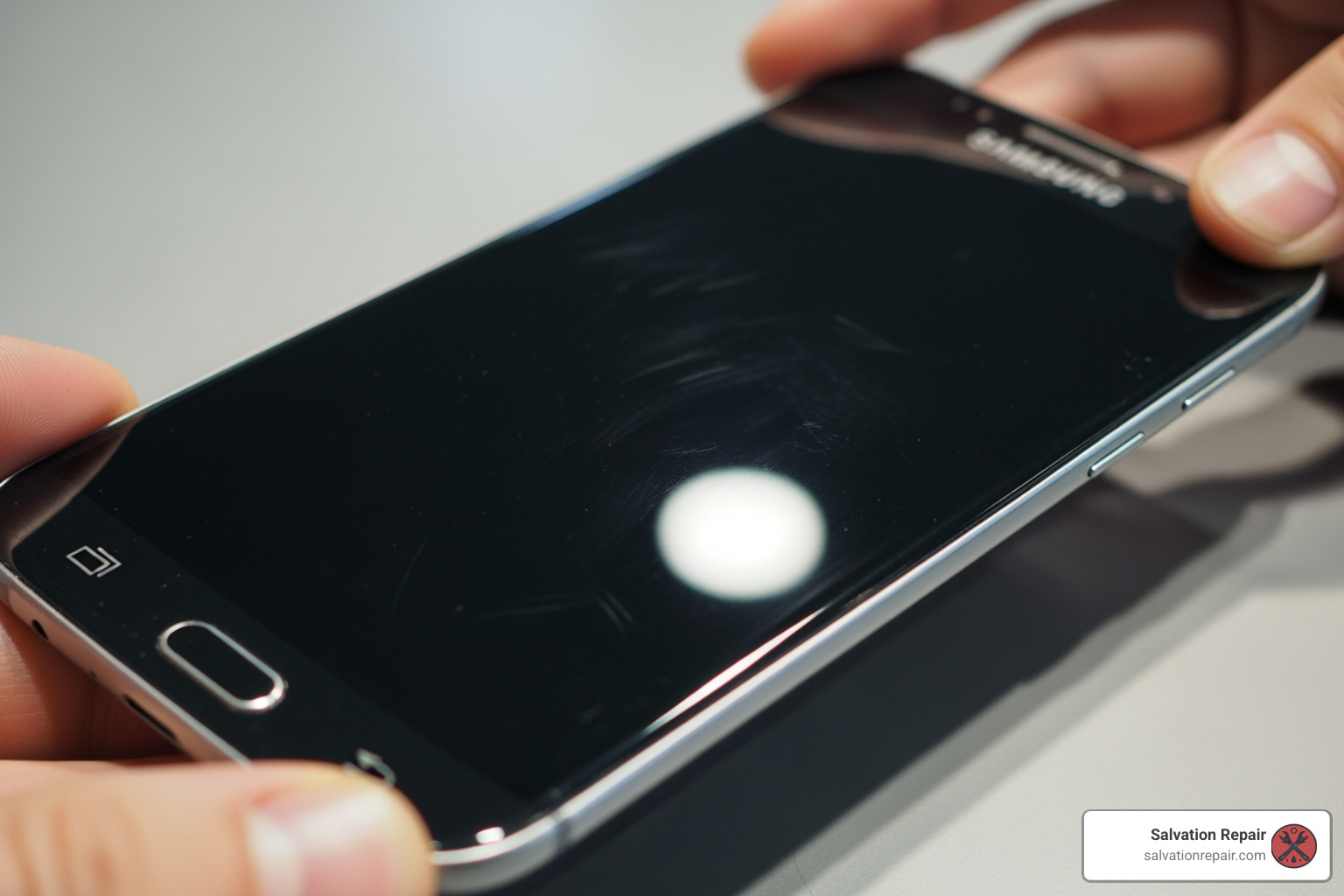
Why Salvation Repair is Your Best Choice for Samsung Phone Repair
We know you have options when it comes to Samsung phone repair, but we believe Salvation Repair offers an unparalleled experience, especially for our neighbors in Laurel, Jackson, and Oxford, MS.
- Local Expertise, Global Standards: We’re your local repair experts, deeply familiar with the needs of our community. But our standards are global. Our certified technicians undergo rigorous training, ensuring they’re up-to-date on the latest Samsung technologies and repair techniques.
- Competitive Pricing & Price Matching: We believe quality repair shouldn’t break the bank. We offer transparent, competitive pricing for all our Samsung phone repair services. Plus, we stand by our commitment to affordability with our price matching policy – find a lower advertised price for the same repair, and we’ll match it!
- Personalized Service: You’re not just another ticket number to us. We take the time to listen to your concerns, explain the repair process in simple terms, and answer all your questions. We want you to feel confident and informed every step of the way.
- Our Unbeatable USPs:
- Lifetime Warranty: We back our repairs with a lifetime warranty on parts and labor. If the repaired component fails due to a defect, we’ll fix it again, no questions asked. That’s peace of mind you won’t find everywhere.
- Price Matching: As mentioned, we’re committed to offering you the best value.
- “Any Device with a Power Button”: While we’re focusing on Samsung phones here, our expertise extends far beyond. If it has a power button, chances are we can fix it!
- Fast Turnaround: As discussed, many of our repairs are completed on the same day, often within two hours. We respect your time and aim to get you reconnected as quickly as possible.
When you choose Salvation Repair for your Samsung phone repair, you’re choosing a team that’s dedicated to quality, affordability, and exceptional customer service. We’re proud to serve the Mississippi community and help you get the most out of your devices. If you’re in the Jackson area, don’t forget to check out our Phone Repair Jackson MS page.
Frequently Asked Questions about Samsung Phone Repair
We get a lot of questions about Samsung phone repair, and we’re always happy to answer them. Here are some of the most common inquiries we receive:
How long does a Samsung screen repair typically take?
We understand that you can’t be without your phone for long! At Salvation Repair, for most standard Samsung models, a screen repair typically takes up to 2 hours for walk-in service. Many authorized repair locations, including ours, aim for this rapid turnaround. For more complex repairs or specific models, it might take a bit longer, possibly up to one business day. We always strive for same-day service, especially if you visit us in Laurel, Jackson, or Oxford, MS. It’s always a good idea to call ahead or check our website for the most accurate time estimate for your specific device and issue.
Will my personal data be safe during the repair?
Your data security is a top priority for us. We implement several measures to ensure your personal information remains private:
- Maintenance Mode Protection: If your Samsung phone runs One UI 5 or newer, we highly recommend activating Maintenance Mode before bringing it in. This feature completely hides your personal data from the technician.
- Importance of Backing Up Data: Even with Maintenance Mode, we always advise you to back up all your data before any repair. This is your ultimate safeguard.
- Factory Reset Recommendation: For maximum privacy, especially if Maintenance Mode isn’t available on your device, performing a factory reset after backing up your data is the best approach. This wipes all personal information from the device.
- Technician Privacy Policies: Our certified technicians are trained to respect your privacy and only access what is necessary to perform the repair. We have strict internal policies to protect your data.
By following these steps, you can be confident that your personal data is secure throughout the Samsung phone repair process.
How much does an out-of-warranty Samsung repair cost?
The cost of an out-of-warranty Samsung phone repair can vary significantly based on a few key factors:
- Model of your Samsung phone: Newer, higher-end models (like the latest Galaxy S or Note series) generally have more expensive parts and, therefore, higher repair costs than older or budget models.
- Type of damage: A simple battery replacement will cost less than a full screen assembly replacement.
- Specific part needed: For example, a cracked screen on a standard Galaxy S23 will differ in cost from repairing the interior folding screen of a Galaxy Z Fold5, as the parts and labor involved are very different. Prices can vary widely depending on the specific component and model.
At Salvation Repair, we offer competitive and transparent pricing. The best way to get an accurate quote for your specific Samsung phone repair is to contact us directly or visit one of our locations in Laurel, Jackson, or Oxford, MS. We’ll diagnose the issue and provide you with a clear estimate before any work begins.
Conclusion: Your Path to a Restored Samsung Device
Dealing with a broken Samsung phone can be a real headache, but it doesn’t have to be a permanent problem. As we’ve explored, you have multiple reliable options for Samsung phone repair, ensuring you can get back to your digital life without missing a beat. From protecting your precious data with Maintenance Mode and careful backups to choosing between speedy walk-in service or convenient mail-in options, the path to a restored device is clearer than ever.
At Salvation Repair, we believe in empowering you with choice and providing expert, trustworthy service. Whether it’s a shattered screen, a failing battery, or a stubborn charging port, our certified technicians in Laurel, Jackson, and Oxford, MS, are ready to bring your Samsung phone back to life. With our lifetime warranty, price matching, and commitment to fast, personalized service, we’re dedicated to making your Samsung phone repair experience as smooth and stress-free as possible. Don’t let a broken phone slow you down.
For expert, reliable, and fast repairs, explore our Services today. We’re here to help!
