Samsung Phone Repair Mobile: 3 Best Options
Understanding Your Samsung Phone Repair Mobile Options
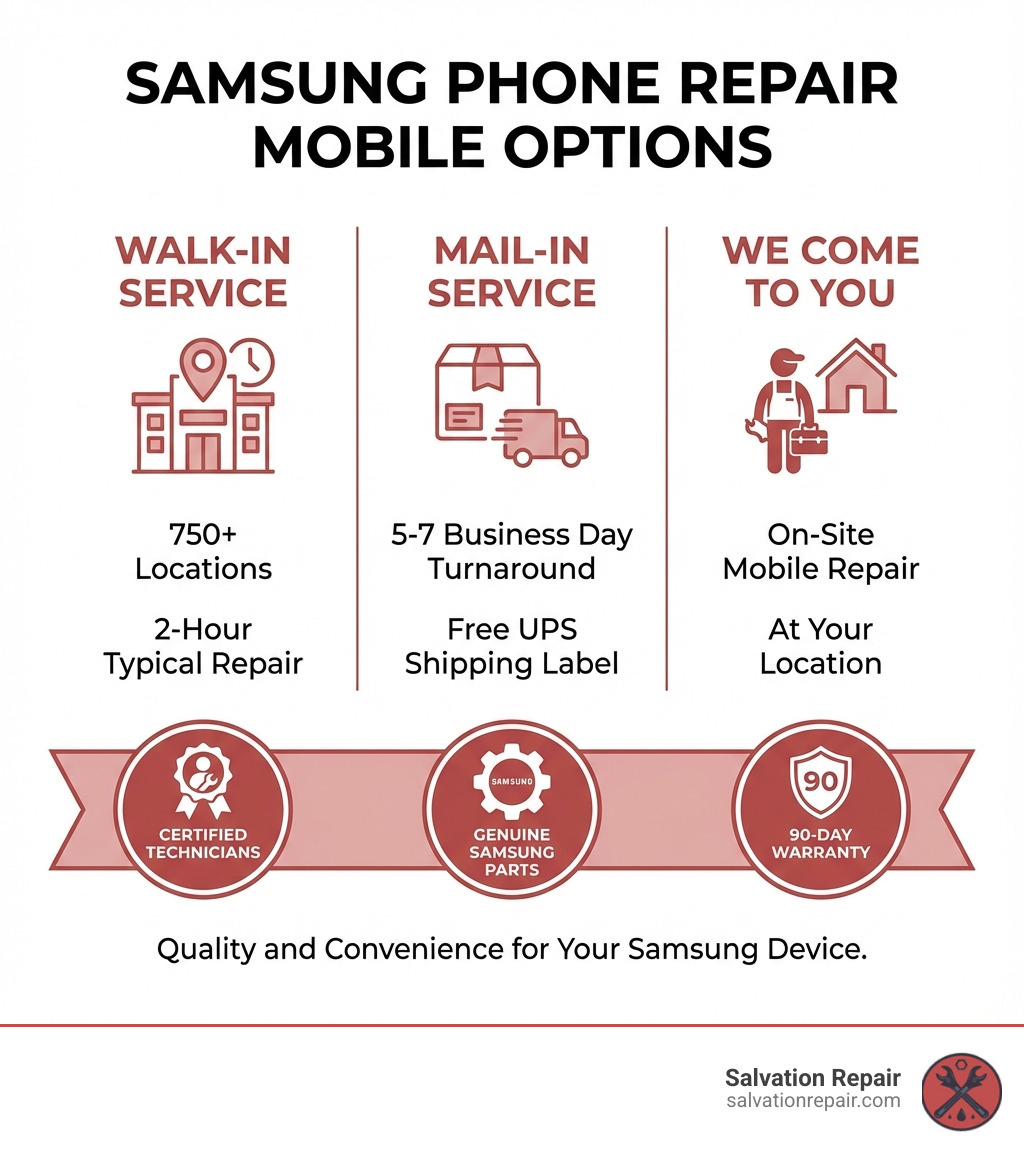
Samsung phone repair mobile services give you three main choices: walk-in repairs at authorized locations (often completed in 2 hours), mail-in service from home (5-7 business days), or convenient “We Come to You” mobile repair at your location. All options use certified technicians, genuine Samsung parts, and include a 90-day warranty.
Quick Repair Options Overview:
- Walk-In Service – Same-day repairs at uBreakiFix locations, typically 2 hours for Galaxy S21 and newer models
- Mail-In Service – Ship your device using a UPS label, 5-7 business days turnaround
- We Come to You – On-site mobile repair at your home, office, or preferred location
- Screen Repair Costs – Galaxy S23 Ultra: $259-$319, Galaxy Z Fold6: $429-$549, Galaxy Z Flip6: $239-$319
A cracked screen, a dead battery, or a faulty charging port can bring your day to a halt, especially when you rely on your Samsung Galaxy for everything.
The good news is that getting your device fixed is easier than you might think. Samsung provides several repair paths to fit your schedule, from local drop-offs to mail-in services and even mobile technicians who come to you.
Before you start any repair, you’ll need to back up your data and prepare your device properly. This protects your personal information and ensures a smooth repair process. And if you have Samsung Care+, accidental damage like cracked screens is covered when it happens.
I’m Ralph Harris, and with over 20 years in electronics repair, I’ve seen every type of samsung phone repair mobile scenario. At Salvation Repair, we’re dedicated to helping people extend the life of their devices and keep electronics out of landfills.
Your Official Samsung Repair Options: Convenience and Choice
When your Samsung Galaxy needs a fix, you have several official samsung phone repair mobile options. Samsung has created a network of services that prioritize convenience and quality, whether you prefer a quick drop-off, shipping from home, or having a technician come to your location.
Walk-In Service: Same-Day Fixes
For those who need a fast solution, walk-in service is ideal. Samsung has partnered with authorized repair centers like uBreakiFix, with over 750 locations nationwide. This means you can likely find a trusted repair center in Mississippi, whether you’re in Laurel, Jackson, or Oxford. The main appeal is speed: most repairs for Galaxy S21 models and newer are completed within two hours, provided you schedule an appointment. Repairs are performed by Samsung-certified technicians using genuine Samsung parts, guaranteeing quality. We always recommend making an appointment to ensure the quickest service.
Mail-In Service: Repair from Home
If a trip to a repair shop isn’t feasible, Samsung’s mail-in service is a convenient alternative. This option lets you send your device to Samsung’s repair facilities from home, which is perfect if you live in a more rural area of Mississippi or prefer shipping. The process is simple: start a service request online, and Samsung will provide a pre-paid UPS shipping label and packaging instructions. You can even get a QR code to have UPS print the label and package the device for you. Once shipped, repairs typically take 5 to 7 business days, and your device is returned via UPS 2nd Day Air. Remember to remove cases, screen protectors, and SIM/SD cards before shipping. You can easily find a UPS dropoff location online.
We Come to You: The Ultimate Convenience
Imagine your phone screen cracks, and instead of rearranging your schedule, a certified technician comes to you to fix it. This is Samsung’s ‘We Come to You’ repair service, and it’s also a service we proudly offer at Salvation Repair across Laurel, Jackson, and Oxford, Mississippi! This on-site repair option is the epitome of convenience. A mobile technician with genuine parts and tools will come to your home, office, or another location to perform the repair, saving you travel time. Scheduling is done online, where you coordinate a time and place that works for you. At Salvation Repair, we understand your time is precious, which is why we offer similar mobile, on-site repair solutions. If you’re curious about this convenient option, we invite you to explore mobile on-site phone repair with us.
Preparing Your Phone for a Smooth Repair Journey
Before any samsung phone repair mobile service, a few crucial steps can safeguard your data and privacy. Forgetting these preparations can lead to data loss or privacy concerns, so it’s important to prepare your device properly.
Step 1: Back Up Your Precious Data
This is the most critical step. Your phone holds important memories and information, so always back up your data before a repair. Samsung offers several ways to do this, including the user-friendly Smart Switch tool for PC/Mac or moving files to an SD card. If your screen is broken, Samsung DeX can be a lifesaver. By connecting your phone to an external display, mouse, and keyboard, you can steer your device and back up files even with an unresponsive screen. We’ve helped many customers recover data this way before a samsung phone repair mobile session.
Step 2: Protect Your Privacy with Maintenance Mode
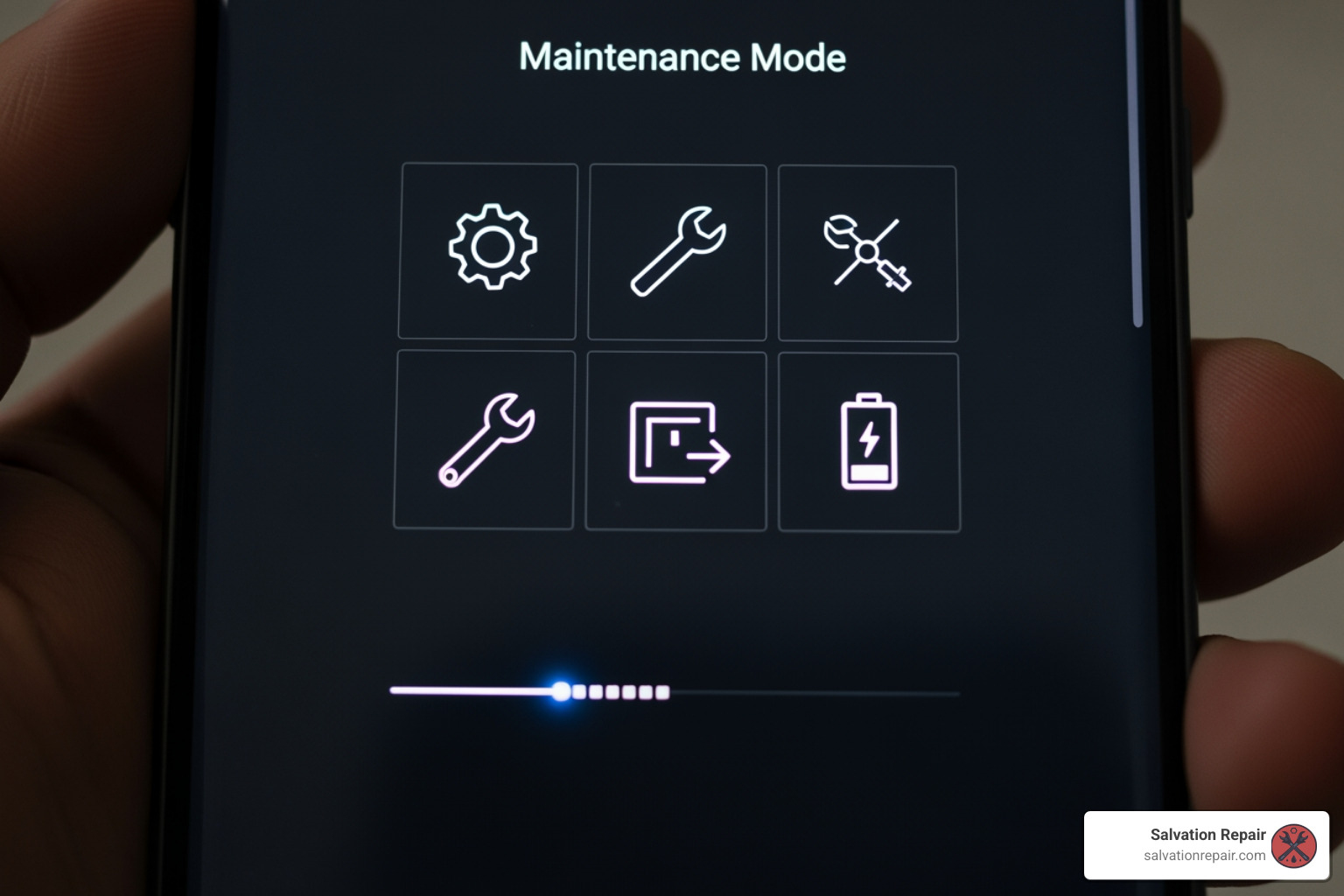
Privacy is paramount. Samsung’s Maintenance Mode is a brilliant feature designed to protect your data during repairs. Available on devices with One UI 5 or newer, it hides all your personal data—photos, contacts, messages, and apps—by creating a temporary, clean user profile for the technician. This prevents them from accessing your sensitive information. You can enable it in your device’s Settings, usually under “Device care.” It’s a simple step that provides immense peace of mind during a samsung phone repair mobile service.
Step 3: Final Security Checks
Even with Maintenance Mode, a few final checks ensure a smooth process.
- Remove Your Google Account: Go to Settings > Accounts and backup > Manage accounts to remove your Google account. This prevents security lockouts after the repair.
- Factory Data Reset: For older devices without Maintenance Mode, a factory reset is the best way to protect your data. This erases everything, which is why backing up first is so vital.
- Remove SIM/SD Cards: Always keep your SIM and SD cards. They aren’t needed for the repair and contain personal information.
- Remove Accessories: Take off any cases or screen protectors, as they can interfere with the repair process.
Common Samsung Phone Repair Mobile Issues and Costs
Even the most advanced smartphones are susceptible to damage. Understanding the most common problems and their associated samsung phone repair mobile costs is key to making an informed decision.
Cracked Screen Repair: Options and Pricing
A cracked screen is the most common smartphone ailment. Beyond aesthetics, it can impair touch functionality and compromise water resistance. Samsung’s official services use genuine parts, ensuring your phone performs as intended. Repair costs vary by model and the extent of the damage.
Here’s a general idea of screen repair costs for popular Galaxy models, based on Samsung’s official pricing (note that these are subject to change):
| Model | Screen Repair (Approx.) | Screen Module Replacement (Approx.) |
|---|---|---|
| Galaxy S23 Ultra | $199 | $319 |
| Galaxy Z Fold6 (Outer) | $149 | N/A |
| Galaxy Z Fold6 (Inner) | N/A | $349 |
| Galaxy Z Flip6 (Outer) | $239 | N/A |
| Galaxy Z Flip6 (Inner) | N/A | $249 |
(Prices are approximate and subject to change. Always confirm current pricing with the repair provider.)
Addressing a cracked screen promptly is important for both usability and preventing further damage.
Special Considerations for Foldable Phones (Galaxy Z Series)
Samsung’s innovative Galaxy Z series phones have unique repair considerations due to their intricate foldable displays. Repairing them is more complex and can be more costly. The main, foldable inner screen is the most delicate and expensive component to fix. The smaller, outer Cover Screen is more like a traditional phone screen and is less costly to repair. Due to their specialized nature, Samsung often recommends mail-in service for these devices to ensure they are handled by highly trained technicians.
Understanding Samsung Care+ for your samsung phone repair mobile needs
Accidents happen, and Samsung Care+ is an extended warranty and accidental damage protection plan that can be a valuable safeguard. It covers incidents like cracked screens and liquid damage for a deductible, which is significantly less than the out-of-pocket cost of an uninsured repair. If you have Samsung Care+, you can start a claim through the Samsung Care+ portal. We recommend considering this plan when purchasing a new device, especially premium models. You can learn more about Samsung Care+ and its benefits directly from Samsung.
The Samsung Repair Process: From Start to Finish
Once you’ve decided on a repair option and prepared your phone, what happens next? Understanding the process, from the benefits of using professional technicians to setting up your device afterward, helps explain the experience.
The Benefits of Professional Repair
When it comes to samsung phone repair mobile, choosing a professional service provider offers distinct advantages over DIY or unauthorized shops.
- Certified Technicians: Professional shops employ technicians who have undergone rigorous training. This means they possess specialized knowledge of Samsung devices, ensuring repairs are performed correctly and to high standards.
- Genuine or High-Quality Parts: Reputable repair services use genuine Samsung parts or top-quality equivalents. These components ensure optimal performance, compatibility, and durability. Using low-quality aftermarket parts can lead to performance issues and a reduced lifespan.
- Repair Warranty: Professional repair providers stand behind their work. Samsung’s authorized repairs come with a 90-day warranty. At Salvation Repair, we go even further, offering a lifetime warranty on our repairs because we’re confident in our expertise and the quality of our work.
- Preserving Device Integrity: Sticking with professional channels ensures your device is handled correctly, protecting it from further damage that can occur during a DIY attempt.
Choosing professional samsung phone repair mobile means choosing quality, reliability, and peace of mind.
How to check the status of your samsung phone repair mobile
If you use Samsung’s mail-in service, it’s natural to want updates. Samsung makes it easy to keep tabs on your device. You can typically check your repair status through their online support portal using your service request number. Many users also opt-in for text message updates, which provide automated notifications as your device moves through the repair process, from receipt to shipment.
Post-Repair: Setting Up Your Device
Congratulations! Your Samsung Galaxy phone is back from its samsung phone repair mobile service. A few final steps will get your device personalized again.
- Restore Your Data: Use the backup you created with Smart Switch or another method to restore your contacts, photos, apps, and settings.
- Sign In to Accounts: Add back your Google and Samsung accounts to re-sync your emails, calendars, and other cloud-based data.
- Reconnect Wearables: Re-pair your Galaxy Watch, Galaxy Buds, or other wearables through the Galaxy Wearable app.
- Test Everything: Before diving back in, test your phone’s core functions. Check the screen, camera, speakers, and connectivity to ensure everything is in perfect working order after the samsung phone repair mobile.
Frequently Asked Questions about Samsung Phone Repair
We often hear similar questions from customers seeking samsung phone repair mobile services. Here are some clear, concise answers.
How long does a Samsung repair take?
The repair duration depends on the service option and the damage.
- Walk-in repair: At authorized centers, many repairs for newer models (Galaxy S21+) can be done in about two hours if you have an appointment. More complex issues might take a business day.
- Mail-in repair: This service typically takes 5 to 7 business days for inspection and repair, not including shipping time. Samsung usually returns devices via 2nd Day Air.
Making an appointment almost always speeds up the process.
What warranty comes with a Samsung repair?
Quality is key. Authorized Samsung repairs are backed by a 90-day warranty that covers the specific parts and labor for the service performed. This is a significant benefit of choosing an authorized service. At Salvation Repair, we stand by our work with an even stronger commitment, offering a lifetime warranty on our repairs because we believe in the lasting quality of our service. You can learn more about our warranty terms.
Can I repair my Samsung phone myself?
While the idea of a DIY repair is tempting, we advise against it for modern smartphones. We champion the Right to Repair, but believe in making informed decisions.
- High Risk of Damage: Smartphones are complex. A simple slip can puncture the battery (a fire hazard), tear a cable, or damage the motherboard, turning a small problem into an unfixable one.
- Voiding Your Warranty: Opening your device or using non-genuine parts will almost certainly void any remaining manufacturer’s warranty.
- Professional Benefits: Choosing a professional samsung phone repair mobile service ensures the job is done by experienced technicians with the right tools, quality parts, and a warranty on the work. It’s often the safer and more economical choice in the long run.
Conclusion
Navigating samsung phone repair mobile doesn’t have to be a daunting task. As we’ve explored, Samsung has established a comprehensive ecosystem of support, offering diverse options to get your device back in working order. Whether you prefer the speedy convenience of a walk-in service at an authorized uBreakiFix location, the ease of mailing your phone in from anywhere in Mississippi, or the ultimate luxury of having a technician come to you, there’s a solution custom to your needs.
The key takeaways from our guide are clear: always prioritize backing up your precious data and preparing your device (especially utilizing Maintenance Mode for privacy) before any repair. Choosing authorized services ensures you benefit from certified technicians, genuine Samsung parts, and a reassuring 90-day warranty.
At Salvation Repair, proudly serving Laurel, Jackson, and Oxford, Mississippi, we understand the critical role your Samsung phone plays in your daily life. With over two decades of experience and a commitment to quality, we stand ready to assist with all your repair needs. We specialize in same-day, on-site repairs for a wide range of devices, offering a lifetime warranty and price matching to give you unparalleled peace of mind. From cracked screens to charging port issues and battery replacements, we repair “any device with a power button.”
Don’t let a damaged phone disrupt your life. We’re here to help you get your mobile makeover and keep you connected. For expert, reliable, and convenient repair services, please don’t hesitate to contact us for expert repair services.
