Did Your iPhone 15 Go Swimming? Fast Water Damage Repair in Laurel
What to Do About iPhone 15 Water Damage in Laurel, MS
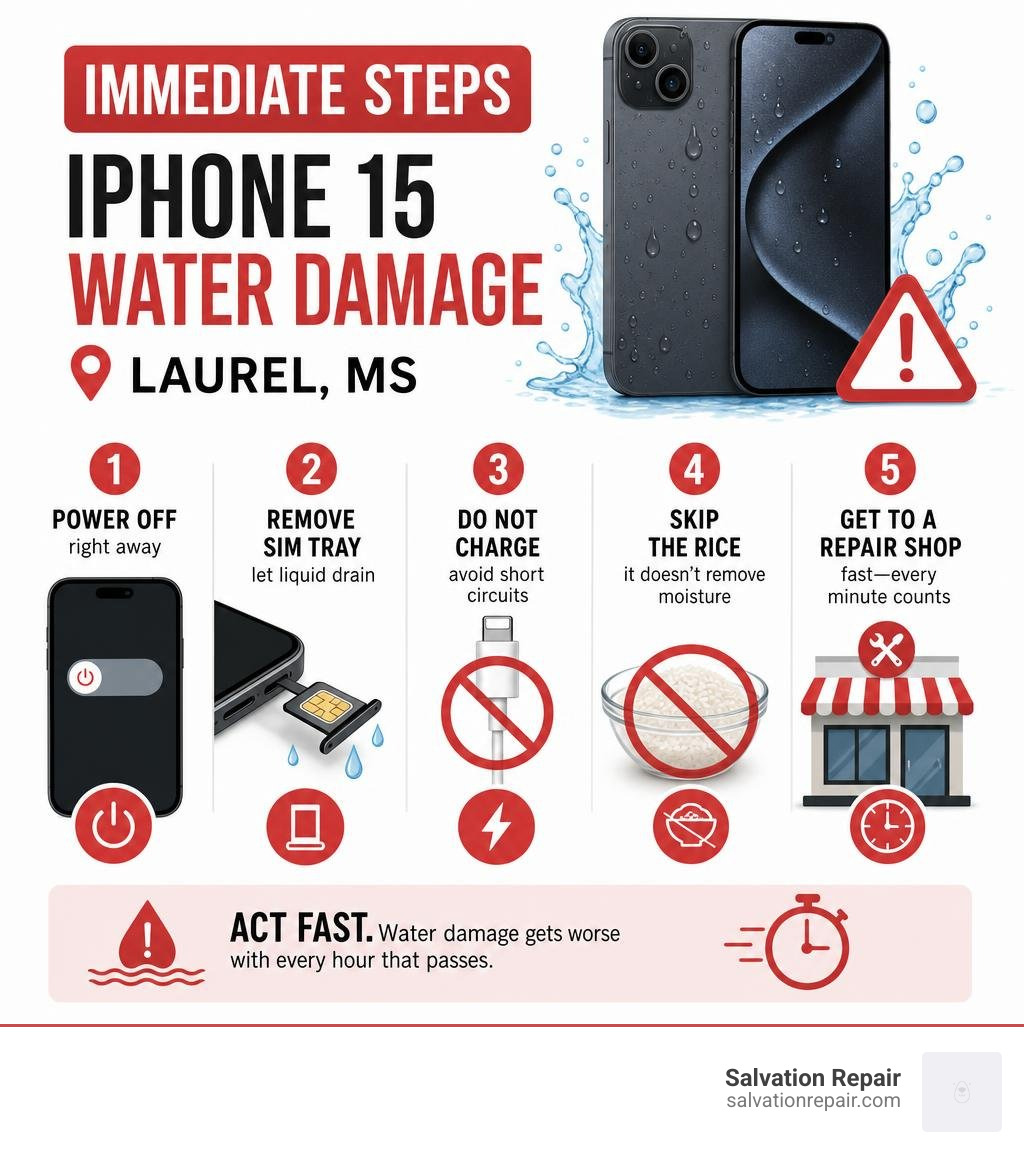
If you’re dealing with iPhone 15 water damage in Laurel, here’s what matters most right now:
Power off your phone immediately, then bring it to a professional repair shop as fast as possible — ideally within the hour.
Here’s a quick-action checklist:
- Power off the iPhone 15 right away — do not turn it back on
- Remove the SIM tray to let any trapped liquid drain
- Do not charge it — this can cause short circuits and make damage worse
- Skip the rice — it does not remove internal moisture or corrosion
- Get to a repair shop fast — water damage gets worse with every hour that passes
The iPhone 15 carries an IP68 water-resistance rating, meaning it can handle up to 6 meters of water for 30 minutes under ideal conditions. But water-resistant is not the same as waterproof. Seals wear down over time, especially after drops or exposure to saltwater and chlorinated pool water. Once liquid gets inside, it starts corroding the logic board almost immediately.
The longer you wait, the worse the damage gets — and the harder it becomes to recover your data or save the device at all.
I’m Ralph Harris, a computer science graduate with over 500 Apple repair certifications and more than 20 years of hands-on electronics repair experience, including extensive work on iPhone 15 water damage in Laurel, MS. In this guide, I’ll walk you through exactly what to do — step by step — so you can act fast and protect both your device and your data.
How to Spot iPhone 15 Water Damage Laurel Symptoms Early
Sometimes, you do not actually see your phone fall into a puddle, a sink, or a swimming pool. You might just walk through a heavy Mississippi downpour, leave your phone in a humid bathroom, or set it down on a wet counter at a local restaurant. Water damage does not always cause an immediate complete blackout. Often, it starts with subtle, strange behaviors that worsen over hours or days as corrosion slowly eats away at the internal copper traces.
Spotting these early warning signs can save you from a permanent hardware failure. If your screen begins flickering, your speakers sound muffled or distorted, or the phone starts restarting on its own, liquid has likely breached the protective seals.
If your screen goes completely dark but you still feel the phone vibrate or hear notifications, you may be dealing with a backlight or display controller failure. For a deeper look at managing these specific display issues, you can read our guide on Troubleshooting black screen issues.
Checking the Liquid Contact Indicator (LCI) on iPhone 15
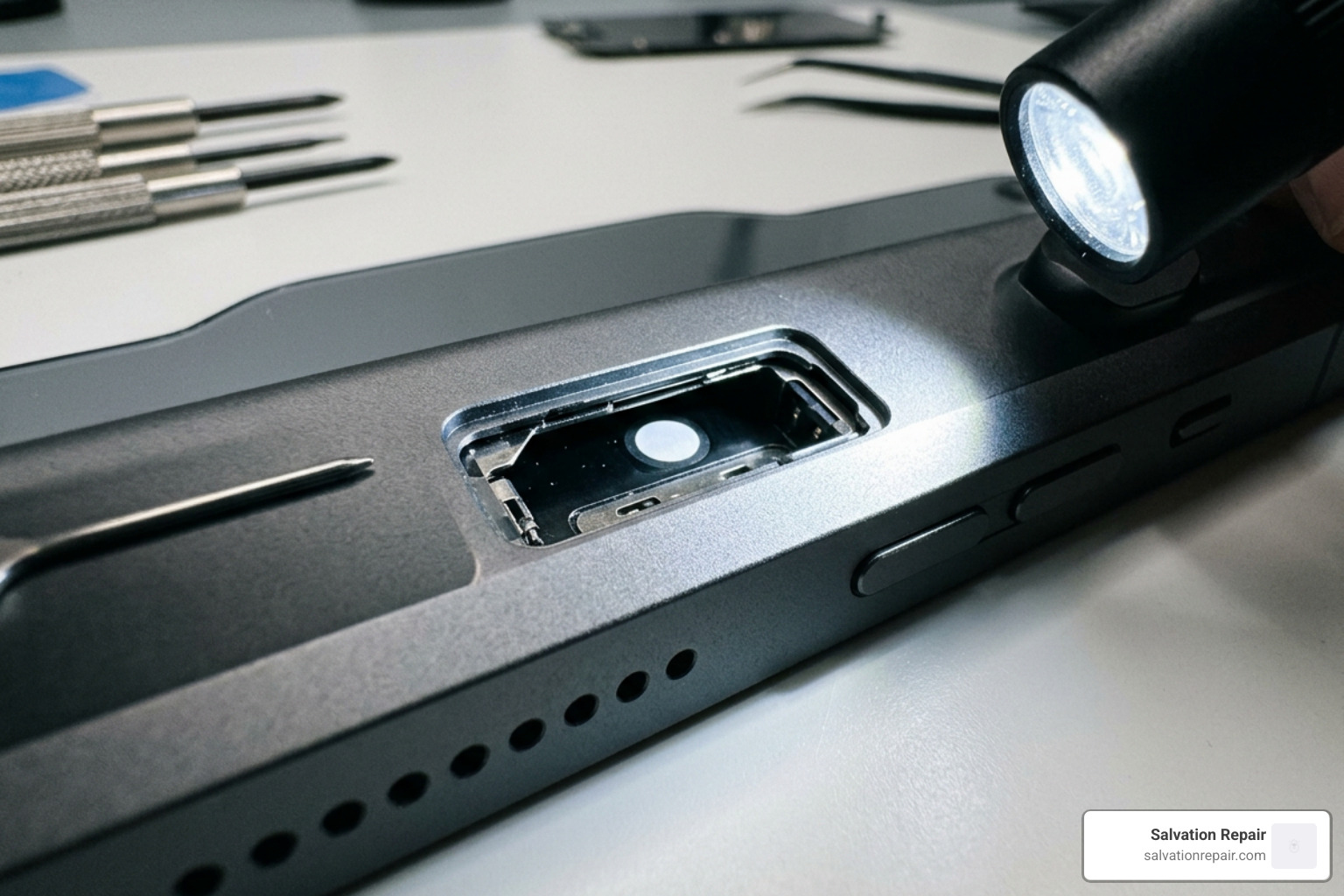
Apple built a simple, definitive way to check for liquid exposure directly into the hardware: the Liquid Contact Indicator (LCI). On the iPhone 15, this indicator is tucked safely inside the SIM card tray slot.
To check your LCI:
- Find a paperclip or a SIM ejector tool.
- Carefully pop out the SIM tray on the side of your iPhone 15.
- Shine a bright light (like another phone’s flashlight or a penlight) directly into the empty SIM slot.
- Look closely at the middle of the slot.
Normally, the indicator patch is completely white or silver. If your phone has suffered liquid ingress, the LCI will turn a bright, unmistakable crimson red. If you see even a tiny speck of red or pink inside that slot, water has bypassed the external seals, and you should seek professional diagnostics immediately.
Hardware Failures Caused by iPhone 15 Water Damage Laurel
When water penetrates the internal chassis of your iPhone 15, it acts as a highly conductive bridge. Pure water itself is a poor conductor, but the water from our taps, pools, and rain is packed with minerals, salts, and impurities. When these minerals bridge two different electrical pathways on the live logic board, they create immediate short circuits.
If your battery is still connected, this electrical current can instantly destroy delicate micro-components like capacitors, filters, and the Power Management Integrated Circuit (PMIC). Over the next few hours and days, a chemical process called electrolysis occurs. This process rapidly accelerates copper corrosion, turning the shiny gold and silver pathways on your logic board into a crusty, green-blue residue that permanently cuts off electrical signals.
The most common hardware failures we see from iPhone 15 water damage in Laurel include:
- The “No Power” State: The phone becomes completely unresponsive, refusing to charge or boot up.
- Boot Loops: The phone displays the Apple logo briefly, turns off, and repeats the cycle endlessly.
- Touchscreen Unresponsiveness: The screen displays images perfectly, but the digitizer fails to register your touch.
- Camera Fogging: Moisture condenses inside the front or rear camera lenses, leaving photos permanently blurry.
If your device has completely lost power and refuses to show any signs of life, check out our comprehensive iPhone no power repair guide to understand how we diagnose and rebuild dead logic boards.
The Golden Hour: What to Do Immediately After Liquid Exposure
When it comes to liquid damage, time is your absolute greatest enemy. We often refer to the first hour after liquid exposure as the “Golden Hour.” The actions you take—and the mistakes you avoid—during this critical window will directly determine whether your phone can be saved or if it will become an expensive paperweight.

Here is exactly what you need to do to stabilize your device:
- Power It Down Instantly: If the screen is still on, hold down the power button and either volume button, then slide to power off. Do not “test” the phone to see if it still works. Every second the phone remains powered on with moisture inside increases the risk of a fatal short circuit.
- Remove the SIM Tray: This breaks the internal vacuum seal of the chassis, allowing trapped air to circulate and providing a tiny escape hatch for evaporating moisture.
- Dry the Exterior: Wipe down the outside of the phone thoroughly with a clean microfiber cloth. Shake the phone gently with the USB-C port facing downward to encourage any water trapped in the charging port to drain out.
- Do NOT Use Rice: This is perhaps the most widespread tech myth in the world. Putting your phone in a bowl of dry rice does not draw moisture out of a sealed iPhone. Instead, the fine starch dust and small grains of rice slip into the USB-C port and SIM slot, mixing with the water to create a thick, cement-like paste that accelerates corrosion and ruins ports.
- Do NOT Apply External Heat: Avoid using hairdryers, ovens, or microwave heaters. High heat will melt the internal adhesive seals, warp the OLED display, and potentially cause the lithium-ion battery to swell or explode.
For more local advice on keeping your devices safe in the hot, humid Mississippi climate, take a look at our Laurel MS phone repair tips.
Professional iPhone 15 Water Damage Laurel Repair Options and Costs
If your iPhone 15 has been submerged, professional intervention is the only reliable way to prevent permanent failure. At Salvation Repair, we offer a transparent, step-by-step diagnostic and restoration process.
When you bring a water-damaged device to us, we do not just let it sit in front of a fan. We completely disassemble the phone, extract the logic board, and place it into an industrial-grade ultrasonic cleaning tank filled with specialized chemical solvents. This process uses high-frequency sound waves to create microscopic bubbles that gently scrub away every trace of corrosion, rust, and mineral deposits from underneath the microscopic chips. If needed, we perform precision micro-soldering to replace blown capacitors or corroded connectors.
To help you understand what to expect, here is a quick breakdown of typical repair options, turnaround times, and general estimates for common water-damage-related repairs:
| Repair Service | Turnaround Time | Process Involved |
|---|---|---|
| Water Damage Diagnostics & Cleaning | 2 to 4 Hours | Complete teardown, ultrasonic logic board cleaning, drying, and full diagnostic testing. |
| Screen Replacement | 10 to 15 Minutes | Removal of damaged display, transfer of sensor arrays, installation of new gasket, and precision calibration. |
| Battery Replacement | 30 Minutes | Safe extraction of degraded or shorted battery, installation of premium cell, and adhesive replacement. |
| Charging Port Repair | 1 Hour | Replacement of the USB-C flex cable assembly and cleaning of the bottom microphone/speaker connections. |
If you are looking for general guidance on keeping your devices running smoothly in Jones County, you can check out our Laurel MS cell phone repair guide.
Screen Replacement Options: LCD vs. OLED vs. OEM
If the liquid exposure has ruined your display—causing green lines, flashing, or a total loss of touch—we offer several replacement screen tiers to fit your budget and performance preferences:
- AQ7 LCD / Standard LCD: This is our most budget-friendly option, with standard LCD repairs quoted at $129.95. It is a highly durable screen, though it is slightly thicker and does not offer the deep, true blacks of an OLED panel.
- Aftermarket OLED: This option perfectly matches the original display technology of your iPhone 15 and is quoted at $129.95. It provides vibrant colors, excellent brightness, and deep black levels at a fraction of the cost of an original Apple screen.
- OEM (Refurbished or New): Sourced to match factory specifications perfectly, our OEM screen repairs are quoted at $149.95.
We also offer screen repairs for other models:
- iPhone 16 Pro: Standard LCD is quoted at $149.95 and OLED at $199.95.
- iPhone 16 Pro Max: AQ7 LCD is quoted at $129.95, aftermarket OLED at $219.95, OEM refurbished at $399.95, and new OEM at $469.95.
Best of all, our iPhone screen repairs take 10-15 minutes in front of the customer, so you never have to worry about your data privacy or where your phone is going.
Battery and Charging Port Repairs After Liquid Exposure
Because the battery and the charging port are the most electrically active parts of your phone, they are usually the first to fail when water enters the device.
The USB-C charging port on the bottom of the iPhone 15 is completely open to the elements. When water enters this port, the metal pins quickly corrode and turn green. If you try to plug in a charger while moisture is still inside, you can instantly burn out the charging port flex cable or damage the main power chips on the logic board. We can complete a full charging port repair quickly, as our charging port repairs take 1 hour, replacing the entire damaged USB-C assembly with a fresh, high-quality part.
Similarly, if water reaches the battery connector, it can cause the battery’s protective circuit board to short out, leading to rapid drain, overheating, or a phone that refuses to boot. Our team can perform a safe, professional battery replacement, and our battery repairs take 30 minutes, ensuring your phone has a stable, reliable power source once again. During every single repair, we also replace the internal adhesive gasket to help restore your iPhone’s original water resistance.
Can You Recover Data from a Water-Damaged iPhone 15?
“Will I lose my photos?” This is the very first question almost every customer asks us when they bring in a wet phone.
The short answer is: Yes, data recovery is highly possible, but it requires specialized professional tools.
Modern iPhones, including the iPhone 15 series, use highly advanced, file-based encryption that is cryptographically paired directly to your unique logic board and CPU. This means you cannot simply desolder the storage chip and read the data on another device. In order to get your photos, contacts, and messages back, the original logic board must be repaired to a point where it can successfully boot up, accept your passcode, and decrypt the files.
Our data recovery process focuses on stabilization rather than long-term restoration. Under a high-powered repair microscope, our technicians carefully inspect the board for short circuits along the main power lines. Using micro-soldering, we remove and replace damaged micro-components to restore steady power to the CPU and memory chips. Once the board can boot up, we immediately back up all of your data to a secure drive or cloud account.
If you are currently facing a data emergency and need an expert technician to look at your device right away, find our nearest location through our Device repair near me page.
Frequently Asked Questions About iPhone 15 Water Damage
Is the iPhone 15 waterproof or just water-resistant?
The iPhone 15 is water-resistant, not waterproof. It carries an IP68 rating under IEC standard 60529, which means it can withstand submersion up to a maximum depth of 6 meters for up to 30 minutes.
However, this rating is only achieved in controlled laboratory settings using fresh water on brand-new devices. In the real world, the rubber gaskets and adhesive seals that keep water out degrade naturally over time due to daily wear and tear, drops, and temperature shifts. Furthermore, chemically treated pool water (chlorine) and saltwater are highly corrosive and will eat through these seals much faster than fresh rainwater or tap water.
How much does it cost to fix iPhone 15 water damage Laurel?
The cost of repairing water damage varies widely depending on how deep the liquid penetrated and which parts were affected. A simple diagnostic check and ultrasonic cleaning to prevent future corrosion is very affordable. However, if the water destroyed the OLED screen, shorted the battery, or fried the logic board, the cost will increase depending on the replacement parts needed.
To give you an idea of typical repair pricing structures for other devices, you can compare these services with our iPad water damage repair cost comparison. We always provide a complete, transparent estimate after our initial diagnostics, so you know exactly what to expect before we begin any work.
Will putting my wet iPhone 15 in rice save it?
No, putting your wet iPhone 15 in rice will not save it. While this is a very common piece of internet advice, professional repair technicians agree that it does more harm than good. Rice acts as an insulator, trapping warm, humid air inside the phone and actually accelerating the corrosion process. Additionally, the starch dust and tiny particles from the rice can easily enter the charging port, speaker grilles, and SIM slot, creating a stubborn paste that can permanently ruin your hardware.
Conclusion
A dropped phone or a sudden splash does not have to mean the end of your iPhone 15. By acting quickly, keeping the power off, and avoiding common DIY mistakes like the rice trick, you give your device the absolute best chance of a complete recovery.
At Salvation Repair, we are proud to serve the communities of Laurel, MS, Jackson, MS, Ellisville, MS, Soso, MS, Meridian, MS, and the surrounding Jones County area. We specialize in fast, high-quality, on-site repairs for all of your favorite devices. We stand behind our work with an industry-leading lifetime warranty on all replacement parts and labor, and we proudly offer price matching to ensure you always get the best value. Whether it is an iPhone, iPad, Samsung phone, or laptop, we can fix “any device with a power button.”
If your iPhone 15 has suffered liquid exposure, do not wait for corrosion to set in. Book your appointment today on our Laurel Phone Repair Services page, find a convenient location near you using our Fix my phone near me directory, or explore our full range of services on our Laurel MS smartphone repair page. We will get your device dried, cleaned, and running like brand new in no time!

One thought on “Did Your iPhone 15 Go Swimming? Fast Water Damage Repair in Laurel”