How to Find Affordable Apple Front Screen Replacement Options
Affordable Apple Front Screen Replacement Starts With the Right Choice
Apple front screen replacement can be fast and affordable, but the best option depends on your iPhone model, screen type, and how much display quality matters to you.
| Your priority | Best starting option |
|---|---|
| Lowest possible cost | Independent repair shop or DIY kit |
| Original Apple parts and calibration | Apple or an authorized provider |
| Fast local repair | A reputable local repair shop |
| Closest match to an OLED iPhone display | Soft OLED, refurbished OEM, or new OEM screen |
A cracked screen is more than a cosmetic issue. Broken glass can cut your fingers, spread across the display, and make touch controls harder to use. If the screen still works, place clear packing tape over cracks to contain loose glass until it can be repaired.
Prices can vary widely based on the replacement part. For example, an iPhone 16 Pro screen can cost $149.95 for LCD or $199.95 for OLED, while iPhone 16 Pro Max options range from a $129.95 standard LCD to $469.95 for a new OEM display. The cheapest choice is not always the best one: display brightness, color, touch response, True Tone, and long-term reliability can all differ.
I’m Ralph Harris, a Wise Level 2 technician and certified Apple repair technician with more than 20 years of electronics repair experience. I have helped customers and repair teams evaluate apple front screen replacement options that balance price, speed, and dependable results.
Comparing Service Providers for Apple Front Screen Replacement
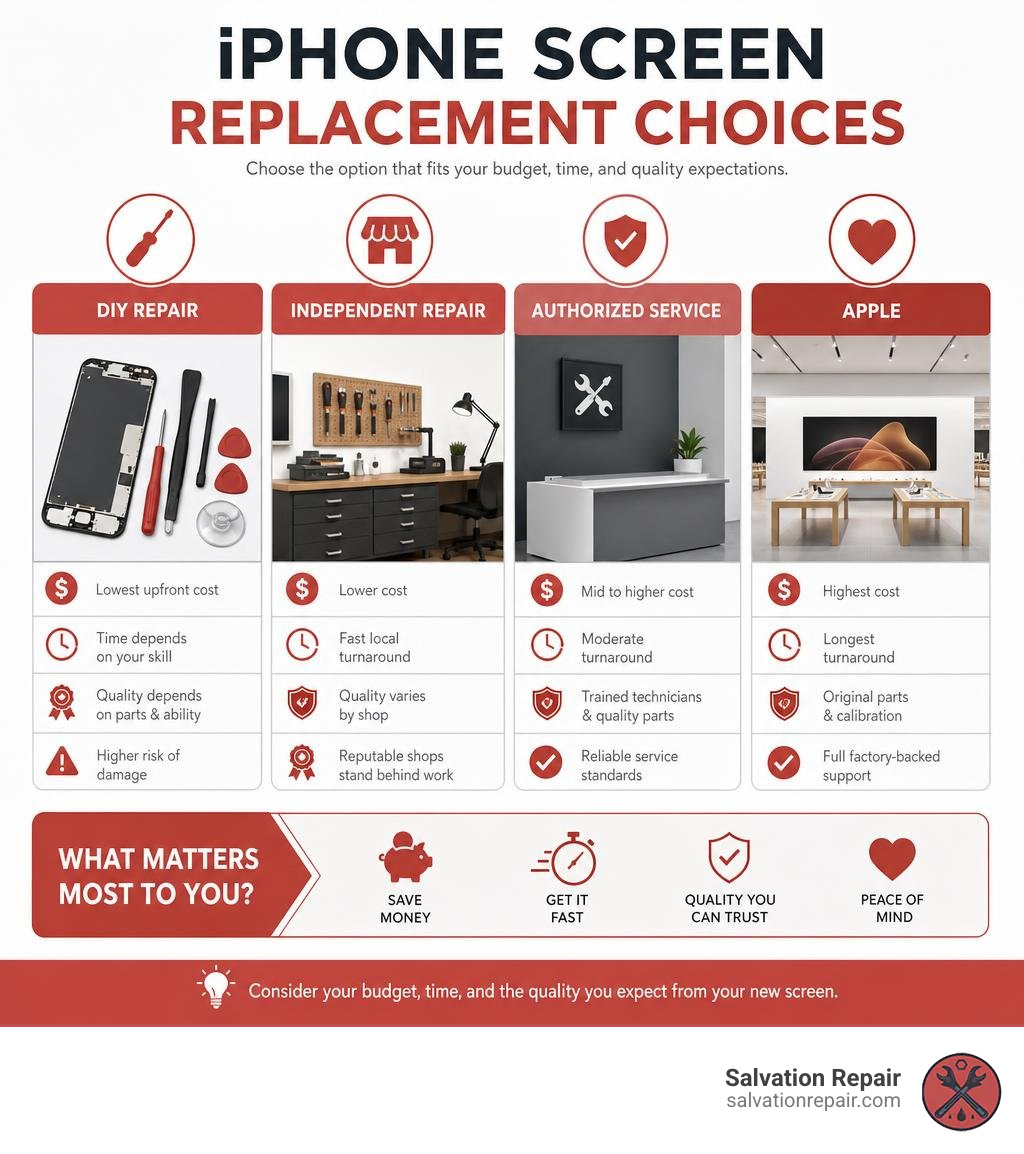
When your glass shatters or your touchscreen stops responding, choosing where to get your screen fixed is your first big step. Should you head straight to the Apple Store, stop by an authorized retail center, mail your phone away, or drop by a trusted local shop in Jones County, Mississippi? Each route offers different trade-offs when it comes to convenience, cost, and overall turn-around time.
Official pathways prioritize factory-backed precision. However, you often pay top dollar out-of-warranty and may have to wait several hours—or even days—to get your device back. On the flip side, local independent repair shops provide quick turnarounds and lower costs, making them a popular choice for budget-conscious phone owners.
To review official Apple service avenues and schedule direct manufacturer appointments, you can check Apple Service and Repair for iPhone Screens. If speed is your main goal, exploring same day iphone screen repair where to go and what to expect can help you decide if a quick local visit fits your schedule better.

Official Apple vs Independent Apple Front Screen Replacement Options
If you carry active AppleCare+ coverage, getting an official apple front screen replacement directly through Apple or an Apple Authorized Service Provider (AASP) like Best Buy is usually a no-brainer. Under AppleCare+, accidental screen damage carries a low service fee (typically $29).
However, if your device is out of warranty, official repair costs jump dramatically—often running anywhere between $129 for older or SE models up to $379 or more for late-model Pro Max flagship phones.
Independent repair facilities fill this void by offering flexible pricing and a range of screen replacement technologies. While unauthorized third-party repairs historically raised concerns about calibration or software warnings, modern independent shops use specialized equipment and high-grade screens to preserve performance without the corporate price tag. For a detailed breakdown of out-of-warranty expenses across different phone generations, see our guide on iphone screen repair cost.
Warranties and Repair Speed Comparison
Turnaround time and warranty coverage vary significantly across repair providers:
- Apple Stores & AASPs: Standard in-person repairs usually take several hours or require leaving your phone overnight. Mail-in service can take 3 to 5 business days. Apple backs out-of-warranty repairs with a 90-day service guarantee.
- Large Retail Chains: Big-box providers often promise same-day service, but actual completion times depend heavily on parts availability. Many typical repairs take 45 minutes or longer.
- Salvation Repair: At our local shop in Laurel, MS, we believe you shouldn’t have to surrender your phone for half a day. We perform iPhone screen repairs in just 10 to 15 minutes right in front of the customer. While you watch, our certified technicians finish the swap. (As a quick comparison, our battery replacements take 30 minutes, and charging port fixes take one hour). Best of all, we back our repair work with an industry-leading lifetime warranty and local price matching.
Screen Replacement Cost Breakdown: DIY vs Professional Repair
Understanding how much a screen repair should cost requires looking at both the hardware replacement tier and who handles the labor. For standard models, standard LCD repairs are quoted at $129.95, aftermarket OLED at $129.95, and OEM at $149.95. Out-of-warranty rates through manufacturer channels remain high, while self-repair kits offer savings if you have the patience and tools to tackle the job yourself.
| iPhone Model | Standard / AQ7 LCD | Aftermarket OLED | OEM / OEM Refurbished | New OEM / Apple Direct |
|---|---|---|---|---|
| Standard iPhone Models | $129.95 | $129.95 | $149.95 | $199 – $329 |
| iPhone 16 Pro | $149.95 | $199.95 | ~$299 | $329+ |
| iPhone 16 Pro Max | $129.95 (AQ7 LCD) | $219.95 (Aftermarket OLED) | $399.95 (OEM Refurbished) | $469.95 (New OEM) |
(Note: Device display technology varies. Flagship models from the iPhone X onward utilize OLED panels, while standard models like the iPhone 11 or SE use LCDs.)
For users interested in how screen clarity impacts repair pricing on specific models, review the real cost of clarity iphone 13 screen repair prices revealed.
The Price Difference of DIY Apple Front Screen Replacement Kits
If you are thinking about repairing your own phone, kit prices depend heavily on the display technology you select. For older LCD-based models (such as the iPhone 8 or iPhone 11), complete DIY repair kits average around $81. For iPhone 12 models and newer, DIY kit costs average closer to $140 due to underlying OLED panel costs.
When buying aftermarket OLED replacement panels, you will generally run into two distinct types:
- Soft OLED: Built on a flexible substrate just like Apple’s original factory screens. Soft OLEDs offer excellent impact resistance, vibrant colors, original contrast levels, and seamless edge fitment. Choosing a Soft OLED kit for iPhone 15 models or older can save do-it-yourselfers roughly $150 compared to official Apple store repair costs.
- Hard OLED: Built on a rigid glass substrate. Hard OLED screens are cheaper to manufacture, but their rigid design makes them far more fragile and susceptible to shattering from minor drops.
- LCD Conversion (including AQ7 LCD): Converting an OLED-native iPhone to an LCD screen (such as an AQ7 LCD panel) is an economical fix, saving fixers compared to official Apple rates. However, LCDs require a backlight, which increases battery drain, adds slight panel thickness, and lowers overall color saturation.
To learn more about selecting the right self-repair hardware, check out iphone 11 screen replacement a product roundup for diyers.
Comparing Aftermarket and Genuine Apple Display Quality
Understanding the distinct repair options available ensures you pick the right balance between price and performance:
- Standard / AQ7 LCD: Highly economical replacement screen option quoted at $129.95 for standard models ($149.95 for iPhone 16 Pro, and $129.95 for iPhone 16 Pro Max AQ7 LCD). While touch responsiveness remains functional, backlight power draw can reduce overall battery life, and black levels appear slightly gray in dark settings.
- Aftermarket OLED (Soft OLED): High-quality third-party screen that closely matches factory specifications, quoted at $129.95 for standard models, $199.95 for iPhone 16 Pro, and $219.95 for iPhone 16 Pro Max. Provides rich contrast, deep blacks, excellent multi-touch sensitivity, and low power consumption without the top-tier OEM price tag.
- Refurbished OEM / OEM: An authentic, original Apple display option quoted at $149.95 for standard models and $399.95 for iPhone 16 Pro Max OEM refurbished. Refurbished OEM panels retain 100% of Apple’s original visual accuracy, color calibration, and brightness.
- New OEM: Genuine, brand-new factory display assemblies manufactured to precise Apple specifications, such as $469.95 for iPhone 16 Pro Max. Offers pristine display output, peak HDR brightness, and full native compatibility.
For a deeper dive into panel construction differences, read iphone 15 pro screen replacement oem vs oled displays.
Technical Considerations: Display Quality, Face ID, and Calibration
Modern iPhones are sophisticated computers where hardware and software work closely together. Replacing an apple front screen replacement assembly involves more than plugging in a ribbon cable; it requires navigating internal sensor integration, micro-soldering standards, and iOS parts pairing software.
To review official software diagnostic policies and hardware calibration guidelines, visit Apple Service and Repair for iPhone.
Impact on Face ID, Touch ID, and Sensor Features
One of the biggest concerns during any screen fix is keeping your biometric security features working properly.
On Face ID devices (iPhone X through iPhone 16 series), the front sensor cluster includes an earpiece speaker, ambient light sensor, and flood illuminator module. In older iOS versions, the flood illuminator was permanently paired to the device’s original logic board. If a technician accidentally damaged or replaced that sensor flex cable, Face ID would stop working completely. To safely retain Face ID, the original upper sensor flex assembly had to be carefully removed from the old screen and transferred to the replacement display panel.
Similarly, on Touch ID devices (like the iPhone SE 2022), the home button sensor is cryptographically linked to the logic board. Transferring the original home button assembly to the new screen is mandatory to keep fingerprint unlocking functional.
Detailed component removal steps can be found in the iPhone 12 Pro Max Screen Replacement – iFixit Repair Guide.
Understanding iOS Unknown Part Messages and Verification
Starting with iPhone 11 models, iOS tracks hardware service history directly inside system settings. If you replace a screen using a non-genuine part, or if a genuine part is installed without running Apple’s official configuration software, your phone will display an “Unknown Part” message under Settings > General > About > Parts and Service History.

Important facts regarding “Unknown Part” notifications:
- Functionality: An “Unknown Part” warning does not lock or disable your phone. Touch controls, app operation, and phone calls continue to work normally.
- True Tone & Auto-Brightness: On older iOS versions (iOS 17.6 and earlier), non-calibrated screen swaps would disable True Tone display features.
- iOS 18 Repair Assistant: Apple introduced an updated Repair Assistant built into iOS 18. This software allows technicians and DIY repairers to calibrate genuine replacement screens directly on the device, restoring True Tone and clearing system warning tags.
- iOS 18 Used Part Detection: On iPhone 15 models and newer running iOS 18, the operating system can detect if a genuine display panel was harvested from another used iPhone, labeling it as a “Used” genuine part in service history.
DIY Preparation, Safety Precautions, and Essential Tools
Attempting a self-repair can be a rewarding project, but smartphone hardware leaves zero room for error. Tiny screws, fragile ribbon cables, and glued glass panels require steady hands and correct preparation.
For step-by-step guidance on handling older LCD displays, consult the iPhone SE 2022 LCD and Digitizer Replacement – iFixit Repair Guide. Before purchasing tools, review estimated component costs on cracked screen repair cost.
Tools and Skills Needed for DIY Screen Fixes
To execute a clean, damage-free repair at home, gather these essential precision tools:
- P2 Pentalobe Screwdriver: Unlocks the two bottom screws flanking the charging port.
- Tri-Point (Y000) & Phillips Screwdrivers: Removes delicate internal metal bracket covers shielding logic board connectors.
- Suction Handle or Anti-Clamp: Grips top glass to pull the display assembly upward away from the frame.
- Plastic Opening Picks & Spudger: Slices through perimeter waterproof adhesive without gouging internal components. Keep pick insertion depth under 3 mm to avoid cutting delicate flex cables!
- iOpener or Heat Gun: Softens tough frame adhesive around screen borders.
- Isopropanol (>90% Purity): Cleans off old adhesive residue before applying new seal gaskets.
Safety Precautions Before Attempting Repairs
Working around lithium-ion batteries and shattered glass poses real physical hazards. Follow these safety rules:
- Discharge the Battery Below 25%: Fully charged lithium-ion batteries pose a serious fire hazard if accidentally punctured by a screwdriver or pick during disassembly. Draining your battery lowers thermal runaway risks dramatically.
- Tape Over Shattered Glass: If your front glass is cracked into small pieces, lay overlapping strips of clear packing tape across the entire screen. This keeps glass splinters out of your fingers and helps suction cups adhere properly.
- Wear Safety Glasses: Tiny glass shards can fly off when prying screen bezels apart. Eye protection is mandatory.
- Organize Screws Carefully: Internal iPhone screws come in various lengths and threads. Inserting a longer screw into a short screw hole can drive metal straight into the underlying logic board, causing permanent device failure.
For instructions on working near internal camera flex modules, refer to the iPhone 16 Pro Front Camera Assembly Replacement – iFixit Repair Guide.
Frequently Asked Questions About iPhone Screen Replacement
Can I replace my iPhone front screen myself without losing Face ID?
Yes, you can replace your iPhone screen at home without losing Face ID, provided you take key technical precautions. When swapping screen panels, you must carefully detach the original earpiece speaker and sensor flex cable assembly from your broken screen and transfer it onto your new display panel. Avoid bending or scratching the flood illuminator or dot projector module.
On iOS 18, you can also utilize Apple’s Repair Assistant software to run post-repair calibration for genuine parts. If you are refurbishing top glass only, precision components like the iPhone 16 Pro Front Glass Replacement with OCA Pre Installed – REPART offer over 95% light transmittance, allowing Face ID sensors to read through the glass without optical interference.
How long does a professional screen replacement take?
Professional turnaround times depend on where you take your device:
- Apple Store / Authorized Providers: Typically takes 2 to 4 hours for in-store appointments, assuming replacement stock is on hand.
- Big-Box Retail Repair Desks: Usually completed within 45 minutes to 2 hours.
- Salvation Repair: We perform iPhone screen replacements in just 10 to 15 minutes right in front of you at our Laurel, MS shop. You can sit comfortably, watch our certified repair technicians work, and walk out with a fully repaired phone in less time than it takes to get a cup of coffee.
Does an Unknown Part notification disable my iPhone?
No, an “Unknown Part” notification will not disable your iPhone or prevent you from using your device normally. Touch input, cellular service, camera functionality, and app performance continue working fine.
The notification simply informs you that iOS could not verify the display panel as a brand-new factory component using Apple’s proprietary server handshake. The notification badge disappears from your main lock screen after a few days, remaining visible only inside Settings > General > About. However, an unverified screen status may slightly reduce the trade-in value when selling your phone to official trade-in programs.
Conclusion
Finding an affordable, reliable apple front screen replacement doesn’t mean you have to compromise on quality or spend hours sitting in a crowded waiting room. Whether you prefer the budget savings of a DIY kit or the speed of a professional technician, matching the right display panel tier (LCD, Soft OLED, Refurbished OEM, or New OEM) to your device ensures you get the exact results you want.
If you are located in Laurel, MS, Jackson, MS, Ellisville, MS, Soso, MS, Meridian, MS, or anywhere across Jones County, Mississippi, bring your device to us at Salvation Repair. We handle everything from iPhones and iPads to Samsung devices and laptops—in fact, we fix “any device with a power button!” (For example, our Samsung S22 Ultra screen replacement options include aftermarket OLED for $219.95, refurbished OEM for $309.95, and new OEM for $339.95, labor included).
Enjoy 10-to-15 minute screen repairs performed directly in front of you, backed by our price matching guarantee and an unbeatable lifetime warranty. For more helpful tips, check out our iphone screen repair complete guide or stop by our shop today!

One thought on “How to Find Affordable Apple Front Screen Replacement Options”