How to Fix PS5 Overheating in Jones County on a Budget
Why PS5 Overheating Jones County Gamers Face Is Driven by Local Climate
To fix PS5 overheating on a budget, immediately remove the side faceplates to vacuum the console’s built-in dust catchers, provide at least 4 to 6 inches of open clearance around all vents, elevate the system off carpets, and switch in-game graphics settings to Performance Mode. These zero-cost adjustments restore airflow and lower thermal strain before internal hardware suffers permanent damage.
Gaming hardware generates substantial thermal output, but the environment surrounding the console dictates how efficiently that heat escapes. In Jones County, Mississippi, summer heat indices consistently spike past triple digits, pushing residential cooling systems to their limits. When indoor climate controls struggle, consumer electronics bear the brunt of the ambient load.
The broader challenge of managing electronics in extreme Southern heat is evident across regional infrastructure. For instance, the local detention facility battled persistent cooling failures for years because its aging units simply could not handle high heat indices. Officials addressed these long-term climate challenges when a New HVAC system at Jones County Jail helping beat the heat was installed to replace the original 1995 hardware. Just as commercial facilities require reliable climate control to prevent system strain, high-performance electronics like the PlayStation 5 require cool, conditioned air to circulate across internal components. When ambient room air sits heavy and warm, internal cooling assemblies lose their ability to exhaust heat effectively.
Mississippi Humidity and Heat Index Triggers
Consumer electronics operate safely within strict ambient limits. Most modern consoles have a maximum safe operating threshold of roughly 95°F (35°C). In Laurel, Ellisville, Soso, and Bay Springs homes, unconditioned rooms, sunlit bonus rooms, or spaces with aging AC units can easily cross this threshold during peak summer afternoons.
Humidity acts as an insulator and transforms regular household dust into a dense, sticky felt. In dry climates, dust blows off surfaces with minimal resistance. In South Mississippi, high humidity binds airborne dust, pet dander, and seasonal pine pollen together. This moisture-laden mixture clings tightly to the intake grilles and settles deep inside heatsink fins. Over several months, this buildup creates an impenetrable blanket that chokes off essential airflow.
Early Warning Signs of PS5 Overheating Jones County Gamers Miss
Hardware protection routines provide distinct warnings before catastrophic component damage occurs. Recognizing these indicators early prevents costly electronic failures:
- Rapid Fan Acceleration: The internal cooling fan aggressively ramps up to maximum speed within minutes of launching a game, sounding like a miniature jet engine.
- Chassis Hot to the Touch: The outer plastic shell and back exhaust vent feel uncomfortably hot, while exhausted airflow feels weak or restricted.
- On-Screen Temperature Notifications: A system dialog box appears stating, “Your PS5 is too hot. Turn off your PS5 and wait until the temperature goes down.”
- Mid-Game Crashes and Black Screens: The console cuts power abruptly without an on-screen warning during graphic-intensive scenes, often pointing to power supply thermal cutoff.
Ignoring these early symptoms leads to secondary power complications. If your console suddenly refuses to power on or emits a single tone, our guide on How to Fix PlayStation 5 One Beep No Power Issue breaks down how severe heat cycles degrade the power delivery network.
Critical Internal Hardware Failures Caused by Severe Heat
Under normal operating conditions, a PlayStation 5 maintains an internal Accelerated Processing Unit (APU) temperature between 65°C and 75°C (149°F to 167°F). During extended, graphically demanding sessions, temperatures can climb higher. When external ventilation fails, internal components quickly reach critical safety cutoffs.
Liquid Metal Migration and APU Dry Spots
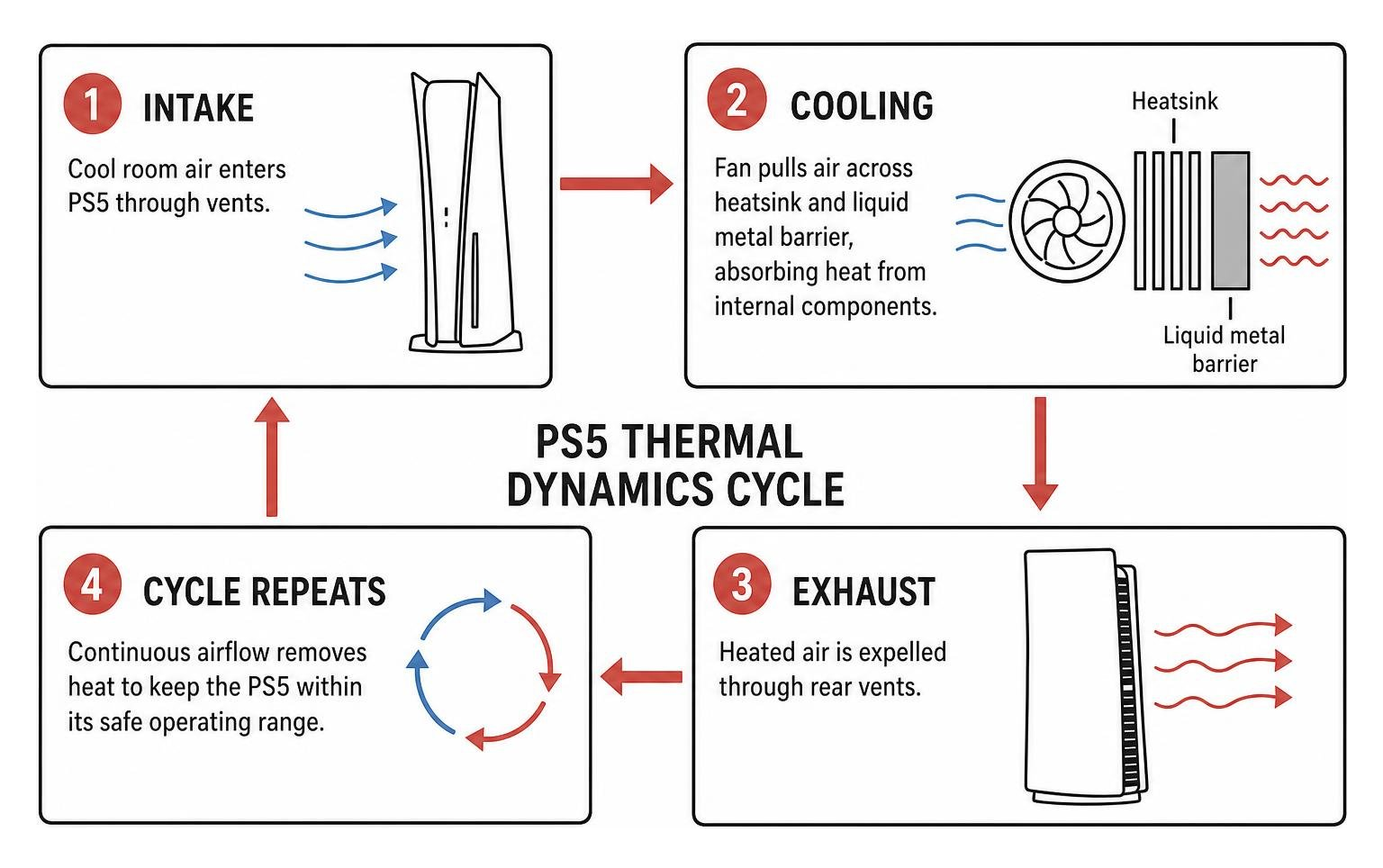
Unlike older consoles that relied exclusively on traditional silicone-based thermal paste, the PS5 uses a specialized gallium-based liquid metal alloy to transfer heat from the APU die to the massive heatsink. Liquid metal delivers exceptional thermal conductivity, but its fluid nature introduces unique failure modes:
- Oxidation and Dry Spots: Sustained operation near maximum thermal limits causes liquid metal to oxidize over several years. This creates dry spots on the APU surface where heat can no longer transfer into the heatsink.
- Foam Dam Deterioration: Sony designed an internal foam barrier and seal to contain the electrically conductive liquid metal. Extreme, repeated heat cycles can degrade this seal.
- Gravity Migration: When consoles stand vertically in hot rooms for years, degraded liquid metal can pool toward the lower edge of the die, leaving the upper portion completely bare.
When dry spots develop, the APU experiences localized thermal spikes within seconds of launching a game. The system firmware detects these runaway temperatures several hundred times per second, triggering immediate emergency shutdowns to protect the silicon.
Power Supply Strain and Cumulative Thermal Wear
The internal power supply unit (PSU) sits at the bottom of the console housing. Dust drawn through the front vents naturally travels across the PSU ventilation holes. As these tiny holes plug with humid debris, the power supply cannot exhaust its own heat.
Heat damage on modern circuit boards is cumulative. Running a console at its absolute thermal ceiling for fifteen minutes inflicts more silicon and solder fatigue than dozen clean, low-temperature shutdowns. A console that experiences one or two thermal cutoffs and is promptly cleaned suffers virtually no measurable reduction in operational lifespan. However, forcing a console through 50 or more overheating shutdowns dramatically elevates the risk of permanent APU solder degradation, power supply capacitor failure, and mainboard warping within 12 to 18 months.
Budget-Friendly DIY Maintenance and Airflow Strategies
You do not need an expensive toolkit to perform essential cooling maintenance at home. Simple preventative measures keep your console running cool without breaking the bank.
To perform a safe at-home maintenance sweep, power down the console completely, disconnect the AC power cord, and let the unit sit for ten minutes:
- Remove the Faceplates: Gently lift the rear corner of each side panel with the PlayStation logo and slide it toward the base to release the locking clips.
- Vacuum the Dust Catchers: Sony built two dedicated triangular dust catcher ports directly into the inner plastic frame. Use a low-suction vacuum with a narrow plastic nozzle to draw accumulated dust out of these catchers.
- Brush the Fan Grille: Use a soft-bristled paintbrush or clean makeup brush to dislodge dust clinging to the intake fan blades and perimeter grilles.
- Avoid Direct Compressed Air Blasts: Never fire high-pressure compressed air cans directly into the fan assembly without holding the fan blades still. Spinning the fan mechanically can generate electrical back-feed into the motherboard, and unguided air simply drives humid dust clumps deeper into the internal heatsink fins.
For additional steps on resolving physical console issues at home, check out our walkthrough on How to Fix a Broken PlayStation in 5 Easy Steps.
Best Practices for Console Placement in Jones County Homes
Console placement plays a massive role in thermal efficiency. Small adjustments to your entertainment setup cost nothing and yield immediate temperature drops:
- Maintain 4 to 6 Inches of Clearance: Ensure at least 4 to 6 inches of open airspace around the top, sides, and rear exhaust vents of the console.
- Ditch the Closed Cabinet: Never operate a PS5 inside an enclosed entertainment center or behind glass cabinet doors. Trapped air quickly loops through the console, compounding thermal load.
- Elevate Off Carpet: Never set your console on carpet or rugs. Carpeting acts as a thermal blanket, restricts bottom air intake, and sheds static-prone fibers directly into the cooling fan.
- Use the Included Stand: Always install the official horizontal or vertical base stand to provide a dedicated air channel beneath the intake panels.
Resolving PS5 Overheating Jones County Issues on a Low Budget
If you are gaming on a strict budget during hot summer months, optimize your software and room settings with these straightforward habits:
- Switch to Performance Mode: In your PS5 system settings, configure games to prioritize Performance Mode rather than Fidelity Mode. Rendering at high native resolutions with uncapped ray tracing forces the APU to draw maximum wattage and generate peak heat.
- Clear the System Cache: Boot the console into Safe Mode (hold the power button until you hear a second beep) and select “Clear Cache and Rebuild Database” to eliminate background software processing loops that spike processor load.
- Run a Room Dehumidifier: Using a standalone dehumidifier in your gaming room drops the ambient moisture level, preventing airborne dust from turning into sticky felt on internal components.
- Game During Cooler Hours: Avoid marathon gaming sessions during peak afternoon heat when residential air conditioning units are working hardest.
Professional Thermal Servicing vs Motherboard Replacement Costs
When standard exterior dusting fails to prevent mid-game shutdowns, the internal liquid metal layer has likely oxidized or migrated away from the APU die. Addressing this issue requires full teardown and precision chemical servicing.
Attempting to reapply liquid metal at home without proper ESD protection, specialized non-conductive barriers, and precision tools carries severe risk. Gallium alloy is highly electrically conductive; a single microscopic droplet spilled onto surrounding surface-mount resistors will instantly short-circuit the motherboard upon boot.
Industry analysis from technical publications like PS5 overheating: common problems and how to fix – Digital Trends emphasizes that internal coolant faults require specialized hardware servicing rather than basic consumer cleaning.
| Service Type | Estimated Cost Range | What the Service Includes | Risk Level / Warranty |
|---|---|---|---|
| Professional Thermal Service | €89 – $120 | Full teardown, heatsink chemical bath, oxidization removal, fresh liquid metal, new foam barrier dam | Low risk; protects original APU; typically includes 90-day to lifetime warranty |
| Motherboard Replacement | €380+ / $350 – $450+ | Complete replacement of mainboard assembly following irreversible APU silicon cracking or severe short circuits | High financial cost; loss of original paired hardware; extensive labor required |
Investing in timely preventative servicing costs a fraction of an entire board replacement. While we focus heavily on console restoration, our technicians at Salvation Repair also handle daily mobile hardware repairs. We perform full diagnostic checks across all consumer tech, whether you need console servicing or smartphone restoration. For mobile display issues, we clearly distinguish between standard LCD (including cost-effective AQ7 LCD options), aftermarket OLED, and OEM screen repair options (including OEM refurbished and new OEM). Standard LCD repairs are quoted at $129.95, aftermarket OLED at $129.95, and OEM at $149.95. For iPhone 16 Pro, LCD is quoted at $149.95 and OLED at $199.95. For iPhone 16 Pro Max, AQ7 LCD is $129.95, aftermarket OLED is $219.95, OEM refurbished is $399.95, and new OEM is $469.95.
For instance, our Samsung Galaxy S22 Ultra screen repairs include professional labor at transparent price points: aftermarket OLED for $219.95, refurbished OEM for $309.95, and new OEM for $339.95. For iPhone users, our screen repairs take just 10 to 15 minutes and are performed in front of the customer, while battery repairs take 30 minutes and charging port repairs take 1 hour. If your display or display connections fail, you can review our In-Depth Guide to PlayStation 5 HDMI Port Repair Costs in Laurel, MS to understand how video circuitry and board components are handled independently. For PlayStation 5 HDMI port replacement, pricing starts at $99.95 and is never lower; HDMI port repairs and board repairs remain distinct, separate services.
Frequently Asked Questions About PS5 Overheating
Can a PS5 survive multiple overheating shutdowns without permanent damage?
A console can safely handle one or two automated thermal shutdowns without lasting damage because the built-in system firmware cuts power before silicon reaches destructive temperatures. However, allowing a console to experience dozens of repetitive shutdowns causes cumulative solder fatigue beneath the APU, ages power supply capacitors prematurely, and can permanently warp the motherboard substrate.
How does high humidity in Jones County accelerate console dust buildup?
High atmospheric humidity introduces fine moisture into the console’s intake airflow. This moisture binds airborne dust, lint, and outdoor pollen into a dense, felt-like layer that adheres firmly to the internal heatsink fins. Unlike dry dust, which blows away easily, humid debris forms an insulating barrier that cannot be removed without physical brushing or full disassembly.
Is it safe to reapply PS5 liquid metal at home?
Reapplying liquid metal at home is not recommended for standard users. Gallium alloys are extremely conductive and corrosive to aluminum components. If the liquid metal spills past the protective foam barrier or touches adjacent motherboard traces, it creates an unrepairable short circuit. Safe application requires micro-swabs, specialized oxidation removers, and precision barrier seals.
Conclusion
Overheating issues do not have to end your gaming sessions or drain your wallet. By understanding how South Mississippi’s climate interacts with high-performance electronics, maintaining open airflow clearance around your console, and performing regular low-suction dust cleanings, you can resolve most thermal bottlenecks at home for free.
When your PlayStation 5 continues to shut down during gameplay, displays persistent temperature error screens, or needs deep liquid metal restoration, turn to local experts who know how to protect your investment. At Salvation Repair, we provide comprehensive electronics care with a price matching policy and an industry-leading lifetime warranty on qualifying repairs. Bring your device to our local shop at 1503 Lakeview Rd, Laurel, MS 39440. If your system requires hands-on hardware servicing, explore our dedicated Gaming Console Repair solutions to get your console running whisper-quiet again.
