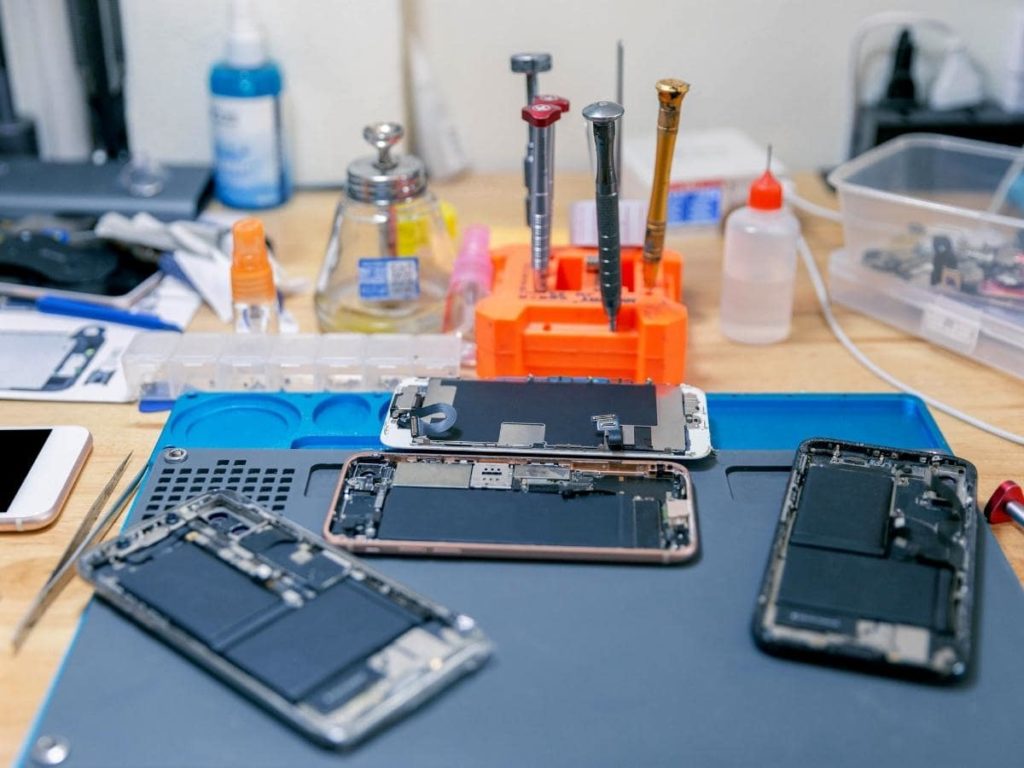
How to Get iPhone Battery Repair in 30 Minutes
How Long Does iPhone Battery Repair in 30 Minutes Actually Take?
iPhone battery repair in 30 minutes is a realistic timeframe for most models — here’s what to expect at a glance:
| iPhone Model | Typical Repair Time | Average Cost |
|---|---|---|
| iPhone 8 | 30 minutes | $59.99 |
| iPhone X–13 | 30 minutes | $99.99 |
| iPhone 14–15 | 30–45 minutes | $99.99 |
| iPhone 15 Pro | 45–60 minutes | $169+ |
| iPhone 16/17 | Same day | $99.99+ |
Quick answer: Most iPhone battery replacements are done in about 30 minutes at a walk-in repair shop. If complications arise — like broken adhesive pull tabs — Apple may ship your device to an offsite depot, which can take 3–5 business days.
Your iPhone battery doesn’t last forever. After 2–3 years of normal use, most batteries lose 20–30% of their original capacity. That means shorter battery life, random shutdowns, and a phone that slows itself down on purpose to avoid unexpected power cuts.
The good news? You don’t need a new phone. A battery swap can restore 80–90% of your iPhone’s original performance — and in most cases, it takes less time than a lunch break.
I’m Ralph Harris, a certified Apple repair technician with over 20 years of hands-on experience running phone repair shops — and I’ve completed more iPhone battery repairs in 30 minutes than I can count. In this guide, I’ll walk you through exactly what to expect, what can speed things up or slow them down, and how to get the fastest, safest service possible.
Why iPhone Battery Repair 30 Minutes Is Possible
How do we take a sealed, water-resistant smartphone and completely replace its power cell in less time than it takes to watch a sitcom episode? It boils down to specialized techniques, dedicated tools, and technical muscle memory.
Modern iPhones are held together with high-grade perimeter display adhesives and heavy-duty battery pull tabs underneath the lithium-ion cell. Experienced technicians rely on precision heat application to safely soften these rubberized water seals without scorching internal flex cables or delicate display layers.
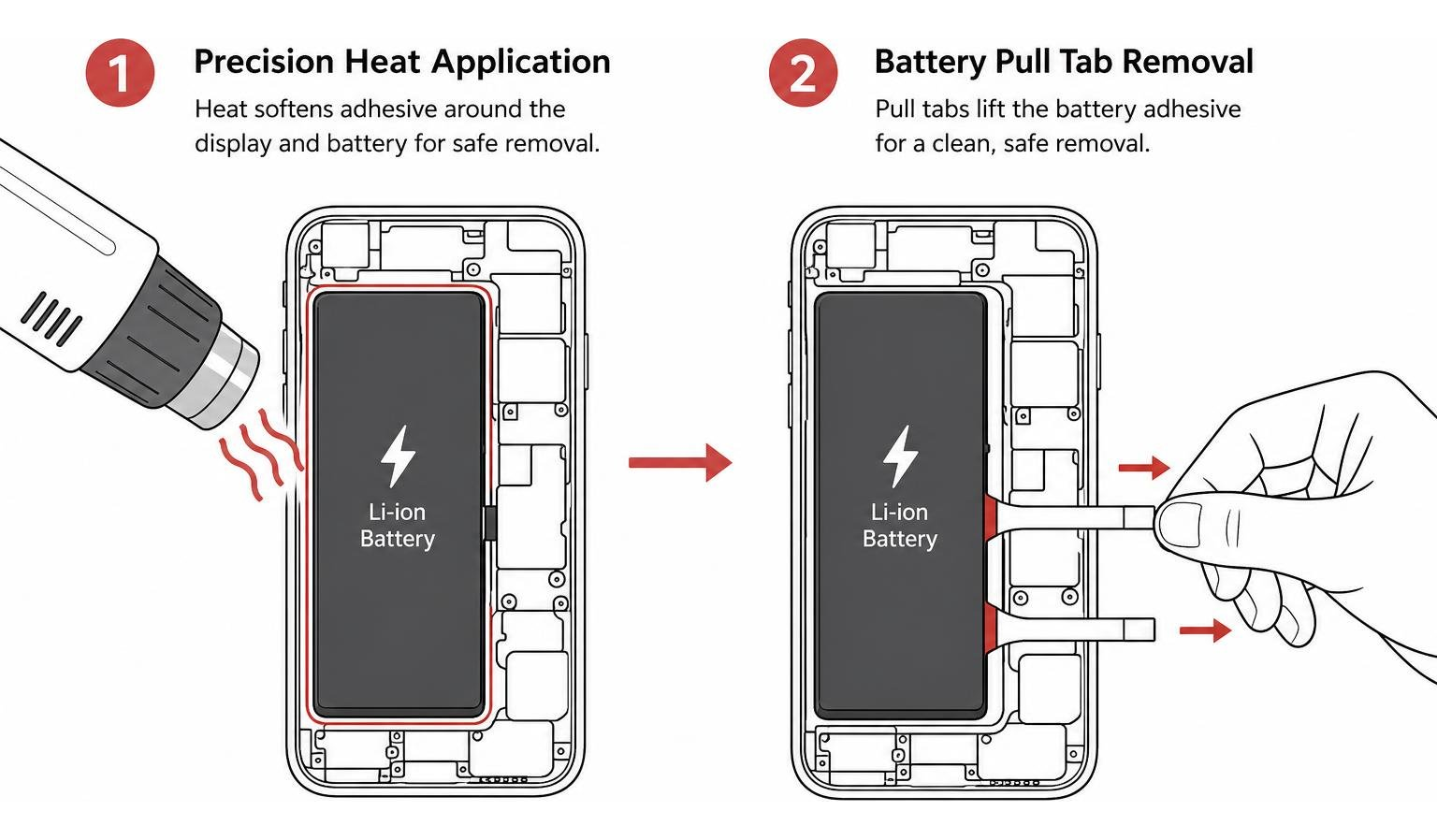
Once heated, non-conductive opening tools release the screen housing, exposing the logic board shield and battery connector. If you are curious about the workflow behind authorized or independent service centers, check out our guide on How to Get Apple Battery Replacement in 3 Simple Steps.
Speed is also built around standardized service protocols. At Salvation Repair in Laurel, MS, we have honed our device repair times to a science:
- iPhone Screen Repairs: Done in just 10–15 minutes and performed directly in front of the customer.
- iPhone Battery Repairs: Completed in roughly 30 minutes.
- iPhone Charging Port Repairs: Handled in about 1 hour.
Whether you are dropping off your device while running errands in Jones County or swinging by from Ellisville, Soso, Meridian, or Jackson, having parts ready on hand turns what used to be a days-long process into a simple while-you-wait experience.
Steps for iPhone Battery Repair 30 Minutes
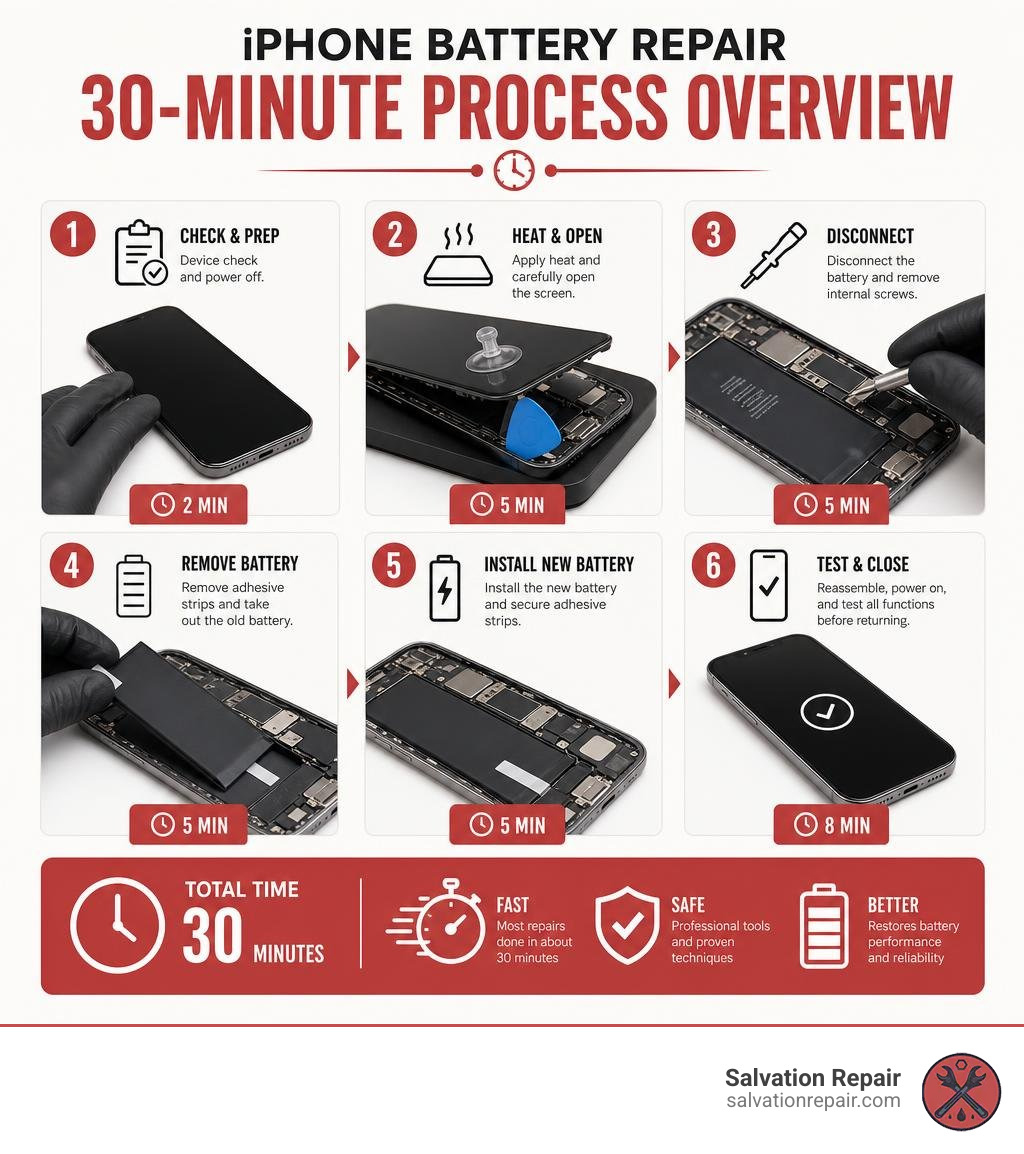
To maintain quality without cutting corners during an iPhone battery repair 30 minutes window, technicians follow a strict step-by-step protocol:
- Pre-Repair Diagnostics: Testing touch functionality, wireless charging, camera operations, and recording initial iOS battery health percentages.
- Precision Heating & Display Detachment: Warming the outer edges to 60°C–70°C to soften the water seal before using suction tools and guitar picks to tilt the display open carefully.
- Power Isolation: Unscrewing the bracket shield and immediately disconnecting the battery flex cable from the logic board to prevent short circuits.
- Battery Extraction: Gripping the stretch-release adhesive pull tabs at the base of the battery and slowly pulling them out horizontally.
- Fresh Part Insertion & Resealing: Placing fresh perimeter adhesive, dropping in an authentic original-capacity or certified replacement cell, and securing the internal brackets.
- iOS Calibration & Verification: Booting the phone, clearing performance throttling states, verifying charging speed, and re-testing system diagnostics.
What Can Slow Down iPhone Battery Repair 30 Minutes
While a 30-minute repair is the industry benchmark, certain complications can stretch that timeline.
- Broken Pull Tabs: If an adhesive tab snaps underneath the battery cell, technicians cannot simply pry it out with a metal screwdriver, as puncturing a lithium-ion cell risks thermal runaway and smoke. Dislodging a tab with isopropyl alcohol solvents can add 15 to 20 minutes.
- Swollen Battery Cells: When batteries degrade severely, chemical decomposition releases gas, swelling the cell like a pillow. Removing a swollen battery requires extreme caution, specialized safety ventilation, and extra time.
- Frame Alignment & Structural Bends: If the phone was dropped, a bent aluminum or stainless-steel corner frame can prevent the display from fitting back into place properly without precision reshaping.
- Offsite Depot Shipping: If an official Apple Store location encounters broken tabs or uncalibrated diagnostic locks, their procedure often dictates mailing the device to an offsite repair depot, taking 3–5 business days.
For insights into official service procedures and manufacturer repair guidelines, you can learn more directly from Apple Support.
How to Tell When Your iPhone Needs a New Battery
You don’t need to guess whether your phone’s power cell is failing. iOS provides built-in tools to show you exact capacity loss, while physical indicators will make it clear when service is long overdue.
To check your battery’s current status:
- Open Settings.
- Tap Battery.
- Select Battery Health & Charging.
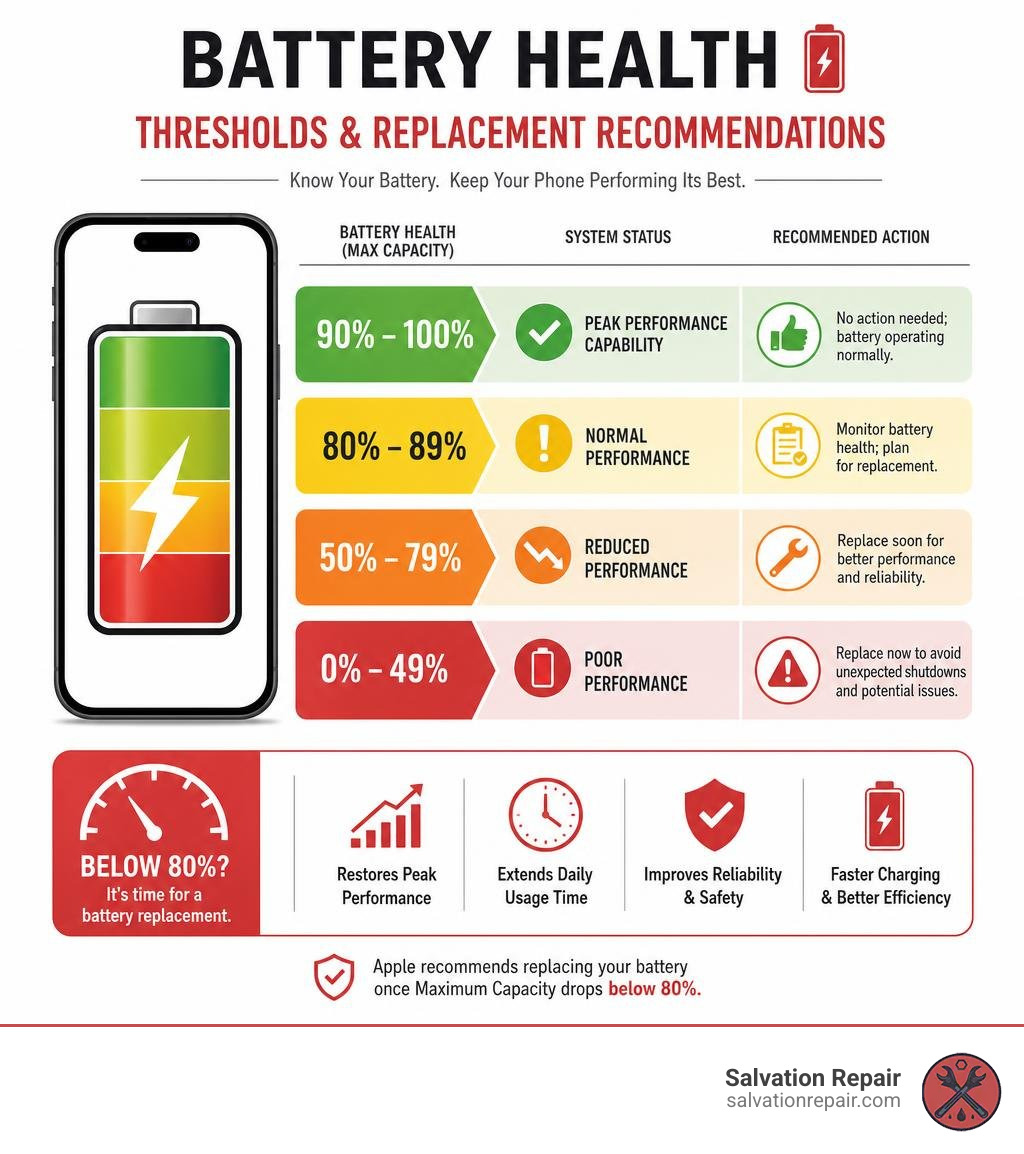
Apple explicitly recommends replacing your battery once the Maximum Capacity drops below 80%. Once your cell crosses this threshold, its internal impedance rises, making it difficult to deliver quick bursts of voltage during heavy CPU workloads.
| Battery Health % | System Status | Recommended Action |
|---|---|---|
| 90% – 100% | Peak Performance Capability | No action needed; battery operating normally. |
| 81% – 89% | Normal Degradation | Monitor drain rates; normal performance after 1–2 years. |
| 80% or below | Service Recommended | Replace battery to resolve lag and fast discharge. |
| Under 75% | Performance Throttled | Severe risk of unexpected shutdowns; immediate replacement recommended. |
When capacity drops significantly, iOS enables Performance Management (CPU throttling) to prevent your phone from crashing when opening complex apps. Replacing the battery removes this artificial speed bottleneck and instantly brings back original system responsiveness. For a detailed breakdown of costs across models, check out The Ultimate Guide to iPhone Battery Replacement and Costs.
Warning Signs Beyond Battery Health Percentage
Sometimes your phone exhibits warning signs long before you check the Settings app:
- Random Shutdowns: Your iPhone suddenly dies at 20%, 35%, or even 50% remaining charge, especially when opening the camera or playing games.
- Rapid Power Drain: Watching your battery counter drop by 1% every couple of minutes during basic texting or browsing.
- Unexpected Overheating: The back of the device feels unusually hot to the touch, even when sitting idle or plugged into a standard charger.
- Physical Display Separation: If you notice a faint white haze on the screen or see the glass lifting away from the side housing, stop using the phone immediately. This indicates a swollen battery pushing outward against the display.
How to Prepare for Your Fast iPhone Battery Service
Preparing your device ahead of time guarantees that your technician can perform an iPhone battery repair in 30 minutes without technical delays or software blocks.
Here is a quick pre-repair checklist to run through before walking through our doors in Laurel, MS:
- Back Up Your Data: While a standard battery replacement does not wipe your phone’s storage, creating an iCloud or computer backup ensures your personal data remains 100% safe.
- Turn Off Find My iPhone: Go to Settings > [Your Name] > Find My, and toggle off Find My iPhone. Apple authorization protocols require this turned off before official battery diagnostics or calibration.
- Charge Your Phone to 20–30%: It is actually safer to open and service a phone when the lithium battery is not fully charged, as lower energy states minimize thermal risks during extraction.
- Note Your Device Passcode: Technicians need access to test front and rear cameras, microphone clarity, display touch responsiveness, and charging speed both before and after the battery swap.
If you are pressed for time, booking an express appointment through our Phone Repair Same Day scheduling tool lets us pre-allocate technician bench time and reserve your specific battery cell ahead of arrival.
Professional Repair vs DIY Replacement Risks
When faced with a dying phone, many users consider buying a cheap $30–$40 DIY battery kit online from sites like iFixit. While self-repair can sound tempting, smartphone architecture has become incredibly intricate over the last few years.
Here are the main risks associated with DIY battery replacements:
- Torn Flex Cables: Display cables, Face ID sensor flexes, and power button lines run directly along the frame. A slip with an opening tool can tear a cable and add hundreds of dollars in damage.
- Stripped Pentalobe & Tri-Point Screws: Apple uses specialized microscopic screws. Using cheap kit screwdrivers frequently strips screw heads, locking the housing shut permanently.
- Thermal Hazards: Prying against a stubborn glued lithium battery with a metal spatula can puncture the casing, resulting in chemical burns, smoke, or fire.
- Loss of IP68 Seal: Failing to properly strip old water seal residue and re-apply pre-cut perimeter adhesive leaves your device totally unprotected against dust and water splashes.
Achieving professional speed without compromising safety requires high-end equipment, specialized heating pads, and hands-on repair experience.
iPhone Battery Replacement Cost and Value Considerations
One of the best parts about replacing an iPhone battery is the sheer value for money. Compared to spending $800 to $1,200 on a brand-new smartphone, a battery service is one of the most affordable ways to extend your device’s lifespan.
Average battery replacement costs across modern devices generally break down like this:
- Legacy iPhone Models (iPhone 8 / SE series): Around $59.99
- Standard Flagships (iPhone X through iPhone 15 series): Around $99.99
- Pro & Extended Capacity Models (iPhone 15 Pro / Pro Max): $169 to $219 depending on standard or extended-life cells
- Latest Generations (iPhone 16 / 17 series): $99.99+ depending on part availability
For a complete breakdown of current repair rates and model availability, check our dedicated iPhone Battery Replacement Cost resource guide.
If you ever experience display damage along with battery degradation, keeping repair costs transparent is vital. Standard LCD repairs are quoted at $129.95, aftermarket OLED at $129.95, and OEM at $149.95. For specific models, options include:
- iPhone 16 Pro: LCD panels cost $149.95, while OLED replacements run $199.95.
- iPhone 16 Pro Max: AQ7 LCD panels run $129.95, aftermarket OLED options run $219.95, OEM Refurbished screens sit at $399.95, and new OEM screens are $469.95.
Understanding the difference between screen display technologies helps you make smart repair choices. LCD screens (including budget AQ7 LCDs) utilize backlighting layers that offer reliable, budget-friendly display function. Aftermarket OLED panels closely mirror factory color vibrancy and power efficiency at lower costs. Meanwhile, OEM options — both factory-refurbished original glass and brand-new original assemblies — deliver 100% genuine manufacturer specs, native brightness calibration, and maximum durability.
Is Replacing Your iPhone Battery Worth It?
How do you decide whether to replace the battery or upgrade to a new phone? Technicians use a simple financial rule of thumb:
The 25% Rule: If the cost of replacing your iPhone’s battery is less than 25% of the cost of buying an equivalent new phone, replace the battery.
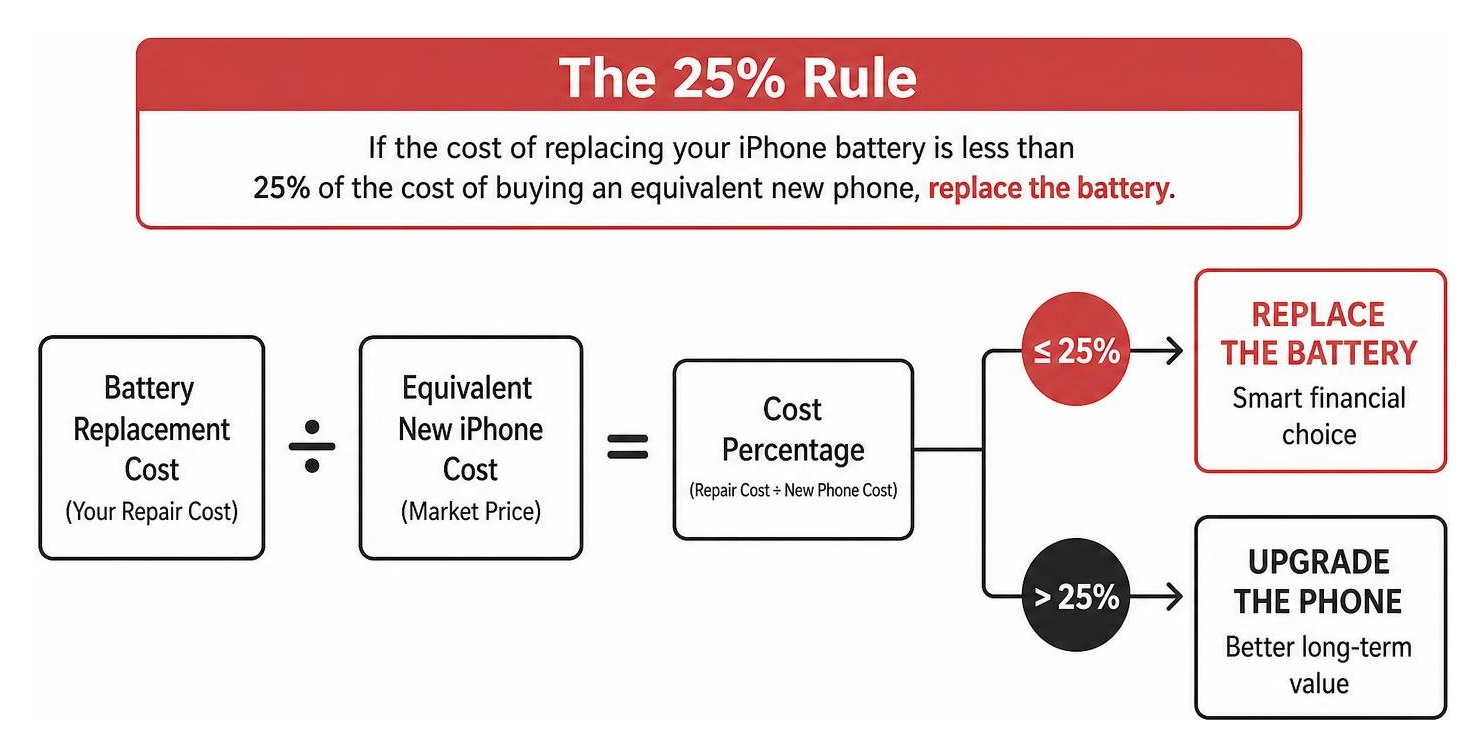
If your iPhone is under 4 years old, the CPU, camera, and screen assembly are still remarkably modern. Replacing a degraded battery restores 80–90% of the device’s day-one speed and extends its usable lifetime by 2 to 3 years. Read more on how local pros breathe new life into older devices in our article on how to Stop Searching and Start Charging with Local Battery Pros.
Frequently Asked Questions About Fast iPhone Repairs
Will replacing my battery wipe my personal phone data?
No. An independent iPhone battery repair in 30 minutes strictly affects the internal hardware power system and does not touch your phone’s logic board or flash storage chip. Your photos, text messages, apps, and personal settings will remain intact.
However, official Apple Store locations frequently require a mandatory software restore during repair procedures. Independent shops, on the other hand, perform hardware replacements without wiping data, though creating a quick cloud backup before any electronic service is always good practice.
How does battery replacement improve iPhone speed?
When an iPhone battery’s maximum capacity drops below 80%, iOS dynamic power management activates performance throttling. To stop the degraded battery from suddenly dropping voltage and causing hardware crashes, the operating system intentionally slows down the clock speed of your phone’s processor.
When a fresh battery cell is installed, the power management system detects healthy voltage levels and automatically disables CPU throttling. Benchmarks instantly bounce back, app launch times speed up, and keyboard typing lag disappears.
Does a 30-minute repair affect water resistance?
Every modern iPhone features a pre-cut rubber and acrylic seal sitting between the glass display and the metal chassis. When opening a device for repair, this original seal is broken.
During a professional 30-minute battery replacement, technicians clean off the old adhesive remnants and lay down a fresh factory-style perimeter water seal before closing the phone. While this restores splash and dust resistance according to original repair standards, no repair shop (including official channels) re-certifies devices for full IP68 water submersion after opening.
Conclusion
Getting an iPhone battery repair in 30 minutes is the single fastest, most affordable way to make a frustratingly slow device feel brand new again. Rather than spending hundreds on an unnecessary device upgrade, a simple 30-minute power swap restores day-long battery life, removes annoying iOS performance throttling, and preserves all your photos and data intact.
At Salvation Repair, we take pride in helping our neighbors across Laurel, MS, Jackson, Ellisville, Soso, Meridian, and all of Jones County keep their mobile technology running smoothly. We back our work with an industry-leading lifetime warranty, price match local competitors, and proudly service any device with a power button.
Whether you need a quick 30-minute battery swap, a 1-hour charging port fix, or an express 10-to-15 minute screen replacement completed right in front of your eyes, we are here to help.
Ready to bring your iPhone back to full power today? Check out our complete iPhone Screen Repair Complete Guide or drop by our shop for fast, reliable service you can trust!
